


Checkbox and radiobutton are not smooth in appearance when size is changed from the default

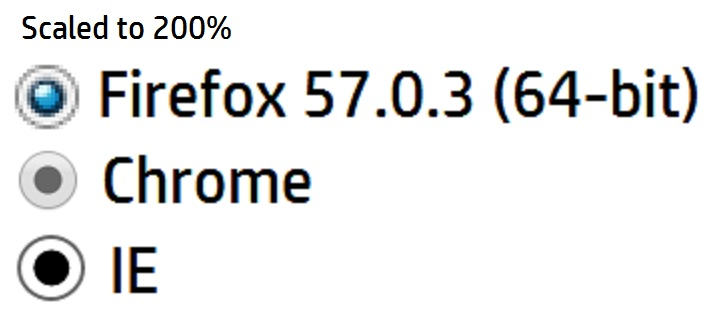
When sizing checkboxes and radiobuttons, they are not displayed smooth (ie. jagged/pixelated). There are CSS tricks to style these but it seems like a lot of work for something that (I think) the browser should handle natively. Other browsers (eg. Chrome, IE, Edge, Safari, etc) do not have this issue and render these controls cleanly when resized.
Toate răspunsurile (4)
Update your Video Card Drivers
Seriously? If that was not a joke, please see attached screen shot.
I'm not seeing this effect on Linux.
Looks that in you case a background image is used that doesn't scale properly. Such an input element usually has "-moz-appearance:radio" and thus in styled via native Windows CSS rules that in your case do not seem to work well when zoomed (i.e. not a scalable (SVG) image)
I went to the site you referenced (above) using Firefox and the radio button displayed the same as it does on my webpage (ie. grainy).
I am not using any images for radio buttons. Therefore, it must be a Firefox image.
I originally started using Firefox at version 2 and have been upgrading it ever since so maybe something is out of whack. Therefore, I uninstalled Firefox and then reinstalled it but the radio button still displays the same.