Windows 10 reached EOS (end of support) on October 14, 2025. For more information, see this article.

Caută ajutor

Atenție la excrocheriile de asistență. Noi nu îți vom cere niciodată să suni sau să trimiți vreun SMS la vreun număr de telefon sau să dai informații personale. Te rugăm să raportezi activitățile suspecte folosind opțiunea „Raportează un abuz”.

Află mai multe

How to Remove Yahoo search

  • 1 răspuns
  • 2 au această problemă
  • 38 de vizualizări
  • Ultimul răspuns dat de cor-el

mai multe opțiuni

I am using WIN 7 PRO and Firefox 57.0.2

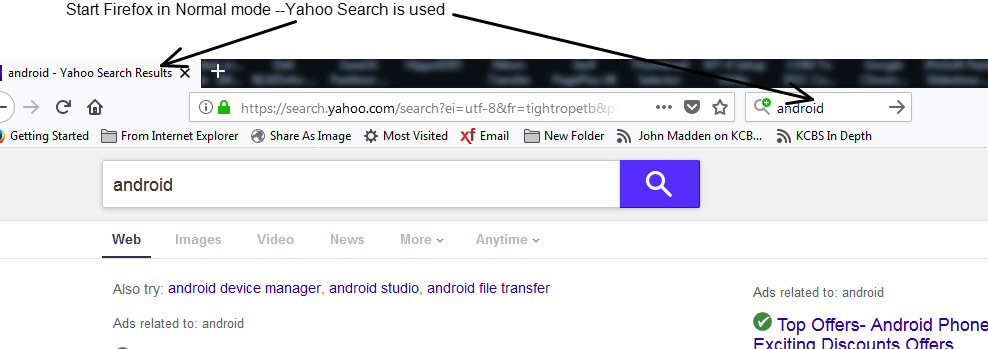
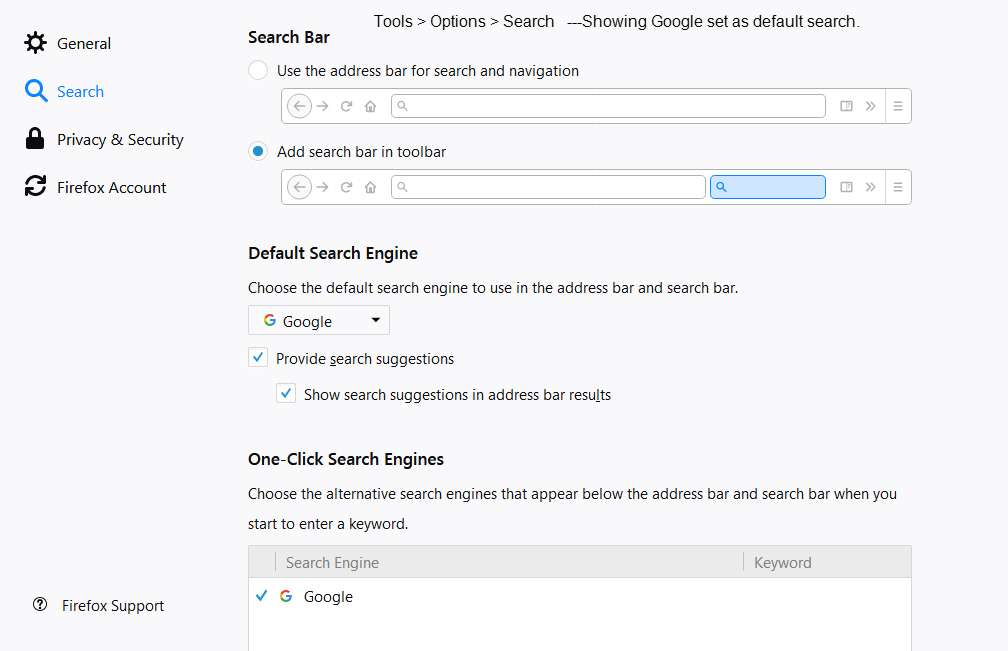
Yahoo search is used as the default search and I can not find a way to completely remove. See screenshot. I have gone to TOOLS > Options > Search. In the "Default search Engine" Google is listed and no other search engines are listed n the drop down box. See screenshot

In the "One-Click Search Engines section; Google, with a check mark, is the only entry. I have removed all other entries.

Close the Tools windows, Exit Firefox and restart, enter a search word, eg Android in the search bar and tap return. Search results are presented as Yahoo Search Results.

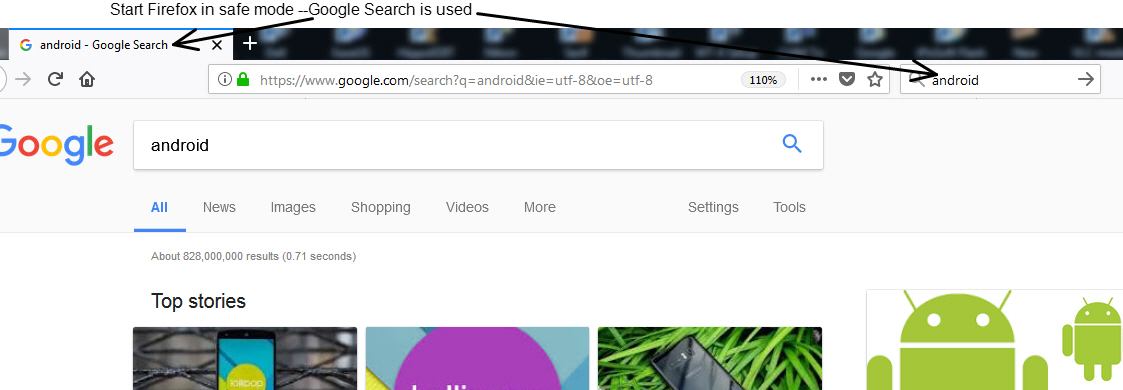
As a test, started Firefox in "safe mode". Enter the same search word, eg Android in the search bar and tap return. Search results are presented as Google Search --- As expected.

I looked at the add -on' and extensions and could find no entries that talked about Yahoo search.

Is there some other place or setting or ?? that is choosing Yahoo Search, in Normal mode?
I am using WIN 7 PRO and Firefox 57.0.2 Yahoo search is used as the default search and I can not find a way to completely remove. See screenshot. I have gone to TOOLS > Options > Search. In the "Default search Engine" Google is listed and no other search engines are listed n the drop down box. See screenshot In the "One-Click Search Engines section; Google, with a check mark, is the only entry. I have removed all other entries. Close the Tools windows, Exit Firefox and restart, enter a search word, eg Android in the search bar and tap return. Search results are presented as Yahoo Search Results. As a test, started Firefox in "safe mode". Enter the same search word, eg Android in the search bar and tap return. Search results are presented as Google Search --- As expected. I looked at the add -on' and extensions and could find no entries that talked about Yahoo search. Is there some other place or setting or ?? that is choosing Yahoo Search, in Normal mode?
Capturi de ecran atașate

Toate răspunsurile (1)

mai multe opțiuni

You can check for recently installed suspicious or unknown extensions.

Start Firefox in Safe Mode to check if one of the extensions ("3-bar" menu button or Tools -> Add-ons -> Extensions) or if hardware acceleration is causing the problem.

  • switch to the DEFAULT theme: "3-bar" menu button or Tools -> Add-ons -> Appearance
  • do NOT click the "Refresh Firefox" button on the Safe Mode start window