


Your connection is not secure?

I do not have Avast, Kaspersky, or ESET, and every website on Firefox Quantum shows a "Your Connection is Not Secure" error.
Error code: SEC_ERROR_UNKNOWN_ISSUER
www.google.com uses an invalid security certificate. The certificate is not trusted because the issuer certificate is unknown. The server might not be sending the appropriate intermediate certificates. An additional root certificate may need to be imported.
support.mozilla.org uses an invalid security certificate. The certificate is not trusted because the issuer certificate is unknown. The server might not be sending the appropriate intermediate certificates. An additional root certificate may need to be imported. Error code: SEC_ERROR_UNKNOWN_ISSUER
Modificat la de decoy
Soluție aleasă
(removed content on request)
Citește răspunsul în context 👍 3Toate răspunsurile (5)

There is security software like Avast, Kaspersky, BitDefender and ESET that intercept secure connections and send their own certificate.
https://support.mozilla.org/en-US/kb/firefox-cant-load-websites-other-browsers-can
https://support.mozilla.org/en-US/kb/firefox-and-other-browsers-cant-load-websites
https://support.mozilla.org/en-US/kb/secure-connection-failed-error-message
https://support.mozilla.org/en-US/kb/connection-untrusted-error-message
http://kb.mozillazine.org/Error_loading_websites
https://support.mozilla.org/en-US/kb/what-does-your-connection-is-not-secure-mean
uses an invalid security certificate SSL_ERROR_BAD_CERT_DOMAIN configured their website improperly
How to troubleshoot the error code "SEC_ERROR_UNKNOWN_ISSUER" on secure websites
https://support.mozilla.org/en-US/kb/troubleshoot-SEC_ERROR_UNKNOWN_ISSUER
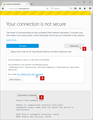
You can click the "Advanced" button to expand this section and show extra details. If the certificate is not trusted because no issuer chain was provided (SEC_ERROR_UNKNOWN_ISSUER) then click the blue error message to expand this section and show the certificate chain. You can click "Copy text to clipboard" and paste this base64 encoded certificate chain text in a reply. That will allow us to details like the issuer of the certificate.
- always be cautious when you get an 'Untrusted' error message
- never create a permanent exception without investigating the cause and only use this to inspect the certificate
Thanks for your help!
Modificat la de decoy
Please : https://support.mozilla.org/en-US/kb/export-firefox-bookmarks-to-backup-or-transfer and https://support.mozilla.org/en-US/kb/back-and-restore-information-firefox-profiles then https://support.mozilla.org/en-US/kb/refresh-firefox-reset-add-ons-and-settings TEST....... If no issues then Extensions which need to be added back in 1 at a time and tested ..... Or it is your Profile : Make a new one and test ...: https://support.mozilla.org/en-US/kb/profile-manager-create-and-remove-firefox-profiles
Please let us know if this solved your issue or if need further assistance.
Soluție aleasă
(removed content on request)
Modificat la de cor-el