Firul de discuție a fost arhivat.
Adresează o întrebare nouă dacă ai nevoie de ajutor.

Rezolvat
Arhivate
When I reply to an email, it puts my signature at the bottom of the original email not the bottom of my reply

This looks weird. I want to reply at the top of the email but it then includes the original email and puts my signature at the bottom of the sender's original email which is not what I want. How do I set it so the signature appears directly under my reply?
This looks weird. I want to reply at the top of the email but it then includes the original email and puts my signature at the bottom of the sender's original email which is not what I want. How do I set it so the signature appears directly under my reply?
Toate răspunsurile (1)
Soluție aleasă
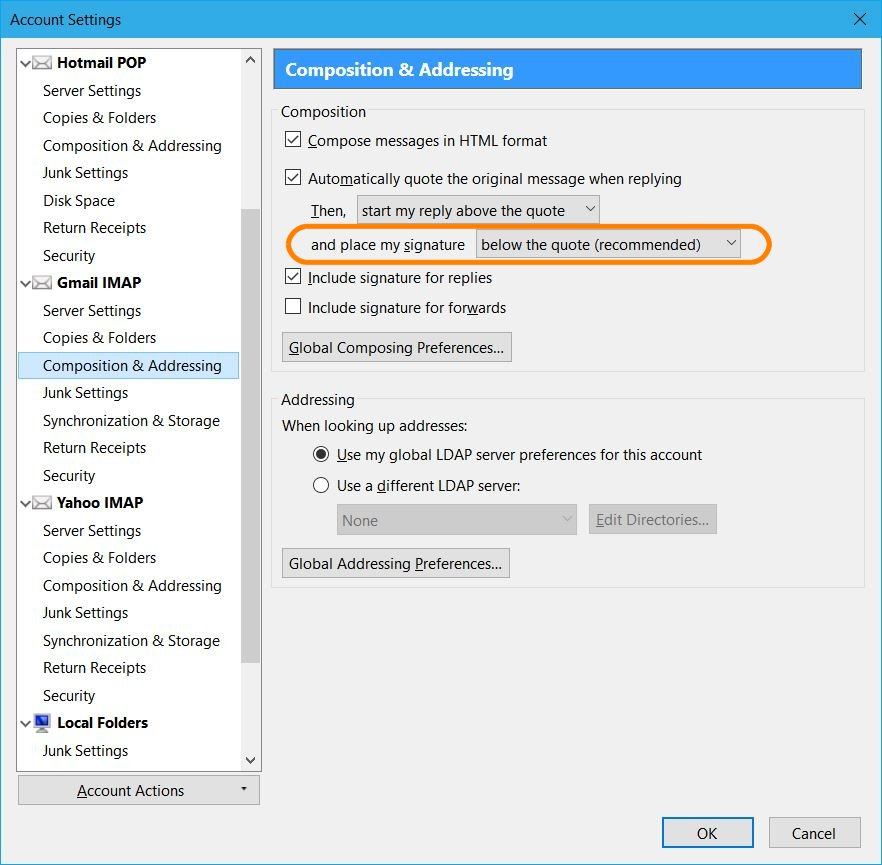
Right-click your account in the normal folder view of Thunderbird and choose Settings.
Select Composition & Addressing on the left side for your account.
I've circled the setting in my screenshot below.