


I can receive emails but cannot send. Using time warner

I cannot send emails from Thunderbird. I can receive all emails sent to me. I can get on the internet with no problem. I can send Emails from the Time Warner Server mail.twc.com. I checked with Time Warner and put in all of the outgoing server information in the Thunderbird set up screen. their outgoing server is mail.twc.com their port is 587. Nothing I do works.
Toate răspunsurile (1)
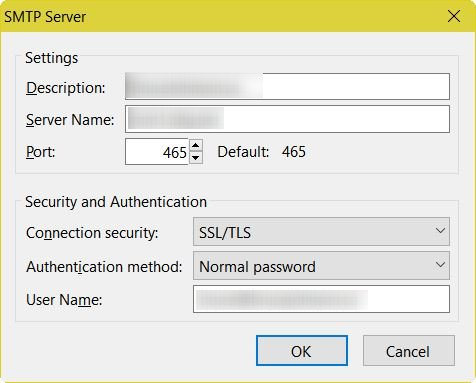
Try different combinations in "Security and Authentication" in the SMTP Server settings. Thunderbird Menu: Tools: Account Settings, Select "Outgoing Server (SMTP)" on the left side. Find and select your Time Warner server on the right, then click the "Edit" button.
See my snip for what you should see.
Connection security should be SSL/TLS, and Authentication method should be "Normal".
Modificat la de user1121639