


Can’t change tags on messages since upgrade to 45.1?

I am a happy user of tags for messages. They stopped working since a recent upgrade to 45.0 or 45.1.
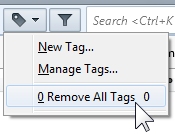
The menu Message › Tag is expected to list the possible configured tags, but only contains one entry “0 Remove All Tags”.
Selecting Message › Tag › 0 Remove All Tags on a message which already has tags, has no effect. The tags stay the same.
The keyboard hotkeys 0, 1, 2, … to set or remove tags don’t have any effect.
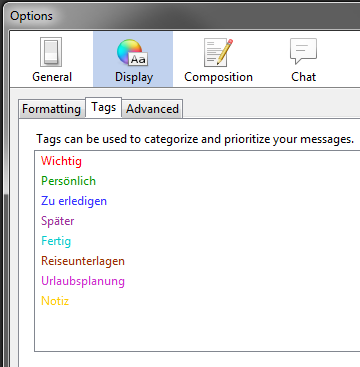
In the Tools › Options › Display › Tags, the existing tags are listed correctly. Previously created custom tags are listed correctly, too. In the dialog it seems I can create and edit tags, but that has no effect outside the dialog.
My e-mails are stored on an IMAP server in case that makes a difference.
Is there anything I can do to make the feature working again or debug the issue? I’m reluctant to re-install or revert to the standard set of tags, because I’ve used custom tags on messages and need them.
Toate răspunsurile (3)
(Added screenshots. Uploading somehow failed when composing the question.)
Soluție aleasă
Restart Thunderbird with add-ons disabled (Thunderbird Safe Mode). On the Help menu, click on "Restart with Add-ons Disabled". If Thunderbird works like normal, there is an Add-on or Theme interfering with normal operations. You will need to re-enable add-ons one at a time until you locate the offender.
Thanks a lot Matt, your advice helped me solve the problem.
The offending add-on in my case was Exchange EWS provider v3.4.0. I’ve upgraded to v3.7.0 and it works now.