


How do I disable the toolbar when using the Firefox PDF Reader?

I have a website that contains an embedded PDF. I want to be able to remove the toolbar and scroll bars that display when using the Firefox PDF Reader.
It is my understanding that I could switch to the Adobe Reader, as they seem to have options that can be set that can achieve what I need, but I am on Linux and there is no longer support for Linux environments.
Is there a way to remove the toolbar and scroll bars when viewing a PDF?
Any help would be appreciated. Thank you.
Toate răspunsurile (2)
Soluție aleasă
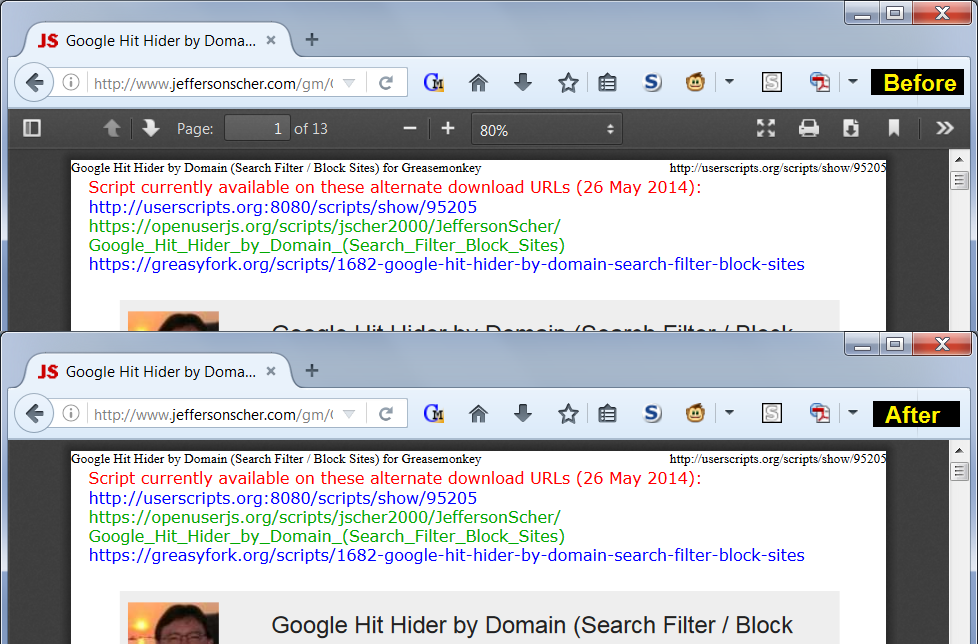
I'm not aware of any setting that removes the toolbar in Firefox's PDF viewer. A custom style rule could do it on a user-by-user basis, for example:
#outerContainer #mainContainer div.toolbar {
  display: none !important; /* hide PDF viewer toolbar */
}
#outerContainer #mainContainer #viewerContainer {
  top: 0 !important; /* move doc up into empty bar space */
}
Example before-and-after screenshot attached.
You can apply custom style rules to content displayed in Firefox using either a userContent.css file or the Stylish extension. Is that something you might want to try?
This worked very well. Thank you for your timely response and thorough answer!