


bookmark toolbar sub-folders within folders

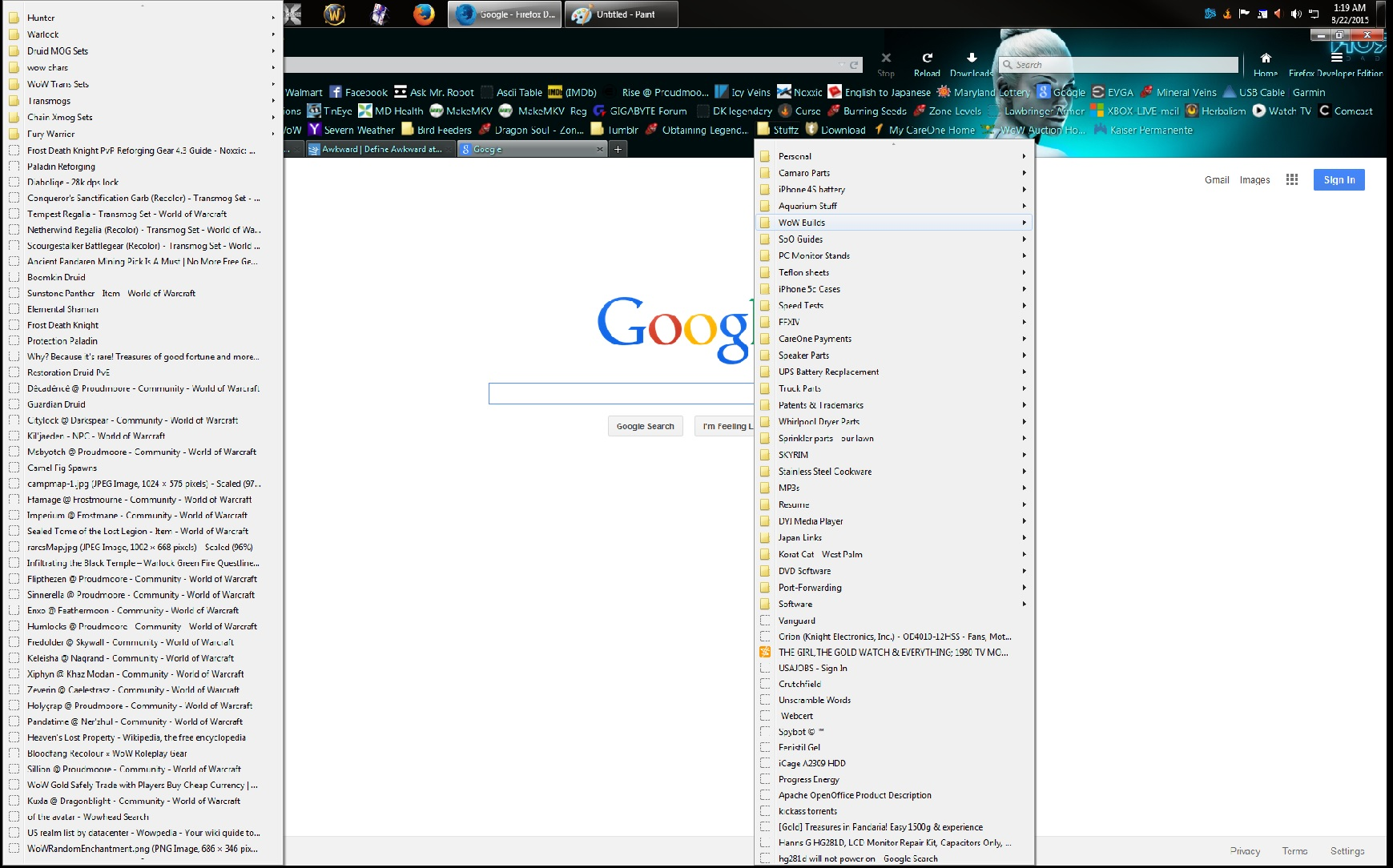
bookmark toolbar sub-folders inside folders (on toolbar) when I mouse over one, it opens on the far left side. Yesterday it opened normally on the right side. I don't need or want to have to move my mouse to the far left side of the screen just to find a sub-folder I'm looking for!
not to mention the fact this is a awkward feature and no option to move it back to the right side, like it has been since the beginning.
if I were left handed maybe this would be ideal but I'm right handed. Perhaps adding this as an optional feature?
Toate răspunsurile (2)
Sorry, I should of mentioned this is with FF Developer Edition 42.0a2 (2015-08-21) on the aurora update channel
also including image since 1st post didn't upload it
You can try to disable hardware acceleration in Firefox.
- Tools > Options > Advanced > General > Browsing: "Use hardware acceleration when available"
You need to close and restart Firefox after toggling this setting.
You can check if there is an update for your graphics display driver and check for hardware acceleration related issues.
Start Firefox in Safe Mode to check if one of the extensions (Firefox/Tools > Add-ons > Extensions) or if hardware acceleration is causing the problem.
- Switch to the DEFAULT theme: Firefox/Tools > Add-ons > Appearance
- Do NOT click the Reset button on the Safe Mode start window