


No sound in various videos on YouTube
I have problem witch sound in YouTube. For example in this video https://www.youtube.com/watch?v=9eu2sF_kQ00 or this https://www.youtube.com/watch?v=3DcEMdNbZM4. No music but video works fine. In Project Spartan this video works without any problems. Any problem with codecs in Firefox?
Everything happens on Windows 10
Soluție aleasă
Do you know whether your Firefox is using the built-in HTML5 video player or the Flash plugin? Typically if you right-click the player, the last line of the custom context menu will tell you wish player YouTube has served you.
If the HTML5 player does not work for you, there is an extension to force Flash on YouTube. (https://addons.mozilla.org/firefox/ad.../youtube-flash-video-player/) That might also be a feature of one of your video downloading extensions.
Citește răspunsul în context 👍 4Toate răspunsurile (9)

If you are using a Windows 10 Beta, or some sort of that, this may be your issue. You might not have correct drivers installed or so on. I would suggest going back to your old Windows version, and waiting on 10. If you don't want to do that, I would suggest finding audio drivers. With a little more info, I could go more in depth..
I have K-lite codecs and how i wrote before no problems on Project Spartan so this is must be a problem with Firefox. Perhaps Firefox have problems with be fully functionally on Win10.
Just might be. Firefox hasn't prepped for Windows 10 just yet, as it hasn't made full release. No further action can be taken as this is the answer.
Soluție aleasă
Do you know whether your Firefox is using the built-in HTML5 video player or the Flash plugin? Typically if you right-click the player, the last line of the custom context menu will tell you wish player YouTube has served you.
If the HTML5 player does not work for you, there is an extension to force Flash on YouTube. (https://addons.mozilla.org/firefox/ad.../youtube-flash-video-player/) That might also be a feature of one of your video downloading extensions.
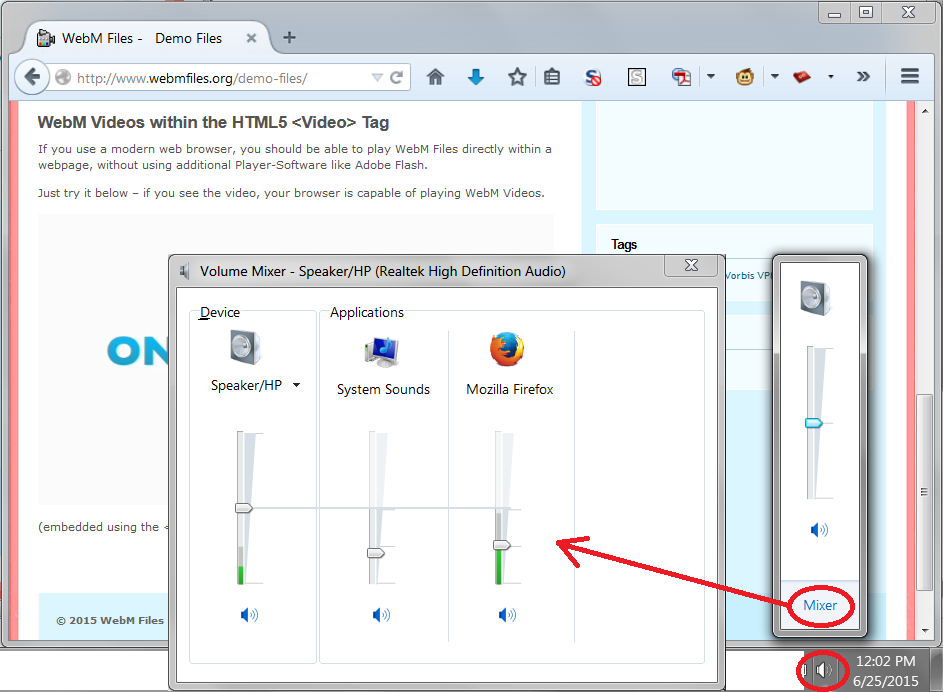
If audio doesn't play on other sites (e.g., http://hpr.dogphilosophy.net/test/) you might also check whether Firefox is muted? On my system, I click the volume icon in the "notification area" of the Taskbar (also known as the tray) and then click a Mixer link. This shows the individual per-application volume controls. I have attached a screen shot for reference.
After changing player to flash i have audio. Volume level is good because only some videos don't have audio. So this is must be a problem with HTML5 and some audio codecs.
Thanks for help.

jscher2000 said
Do you know whether your Firefox is using the built-in HTML5 video player or the Flash plugin? Typically if you right-click the player, the last line of the custom context menu will tell you wish player YouTube has served you. If the HTML5 player does not work for you, there is an extension to force Flash on YouTube. (https://addons.mozilla.org/firefox/ad.../youtube-flash-video-player/) That might also be a feature of one of your video downloading extensions.
Qantumforce said
After changing player to flash i have audio. Volume level is good because only some videos don't have audio. So this is must be a problem with HTML5 and some audio codecs. Thanks for help.
I marked the reply by jscher2000 as the solution.
Note: Even though this solution might not solve the issue for other users, I marked the question solved based on the above reply from Qantumforce, the thread owner.
Modificat la de AliceWyman
Switch on flash solves the problem but i want to use HTML5 becouse flash doesn't support 60fps. Everything works fine on Edge and Chrome. Any ideas ?
Modificat la de matekboss
matekboss said
Switch on flash solves the problem but i want to use HTML5 becouse flash doesn't support 60fps. Everything works fine on Edge and Chrome. Any ideas ?
To matekboss: You posted a reply in a thread started on Jun 25, 2015 by another user, Qantumforce. You should start your own thread, since it will contain detailed troubleshooting information, such as your operating system, installed plugins and Firefox version.
See Mozilla Support rules and guidelines under Posting support requests. Do not re-use existing threads started by others, even if they are seemingly on the same subject. Ask a new question instead.