


Error message. Cannot display webpage i FF

https://www.dropbox.com/s/6kn2erd7glknsa9/Screenshot%202014-07-17%2007.52.08.png There is no error message in Safari but only in FF
By the way: how can I insert an image here ?
Toate răspunsurile (3)


Hello,
Try Firefox Safe Mode to see if the problem goes away. Firefox Safe Mode is a troubleshooting mode that turns off some settings, disables most add-ons (extensions and themes).
If Firefox is open, you can restart in Firefox Safe Mode from the Help menu:
- In Firefox 29.0 and above, click the menu button
 , click Help
  and select Restart with Add-ons Disabled.
- In previous Firefox versions, click on the Firefox button at the top left of the Firefox window and click on Help (or click on Help in the Menu bar, if you don't have a Firefox button) then click on Restart with Add-ons Disabled.
If Firefox is not running, you can start Firefox in Safe Mode as follows:
- On Mac: Hold the option key while starting Firefox.
When the Firefox Safe Mode window appears, select "Start in Safe Mode".
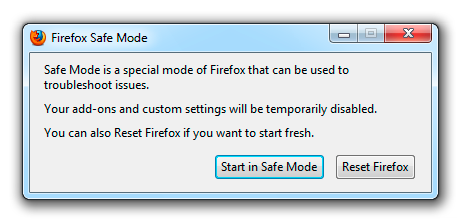
If the issue is not present in Firefox Safe Mode, your problem is probably caused by an extension, and you need to figure out which one. Please follow the Troubleshoot extensions, themes and hardware acceleration issues to solve common Firefox problems article to find the cause.
To exit Firefox Safe Mode, just close Firefox and wait a few seconds before opening Firefox for normal use again.
When you figure out what's causing your issues, please let us know. It might help others with the same problem.
What kind of site gives that kind of error??
In case there is a problem with existing cached files or cookies, could you try the same request in a private window? (Command+Shift+p)
You can try these steps in case of issues with web pages:
You can reload web page(s) and bypass the cache to refresh possibly outdated or corrupted files.
- Hold down the Shift key and left-click the Reload button
- Press "Ctrl + F5" or press "Ctrl + Shift + R" (Windows,Linux)
- Press "Command + Shift + R" (Mac)
Clear the cache and cookies only from websites that cause problems.
"Clear the Cache":
- Firefox > Preferences > Advanced > Network > Cached Web Content: "Clear Now"
"Remove Cookies" from sites causing problems:
- Firefox > Preferences > Privacy > "Use custom settings for history" > Cookies: "Show Cookies"