


How do I edit the suggested autofill information that shows up in the username section of e-mail or Facebook and so on.

Firefox adds account names when you log into different accounts. If you make a mistake then the mistakes will show up as well each and every time. I would like to edit the file to stop this. In the past I have deleted Firefox and re-installed it to fix this problem. I'm sure there's a better way than that.
Solução escolhida
On Mac you need to use Sift+Delete to remove the currently highlighted entry in a drop-down list.
Todas as respostas (9)
Go to the form login and select the mistake with the arrows and press the Delete button, soon the mistake will be deleted
Thank you! But... If you don't mind. How does one access the form manager? My experience with this stuff is limited at best so forgive me for not knowing. I've been looking but I can't seem to find it.
You cant edit the information that will be show on autofill you can delete what you typed, but no edit, sorry
If you want see the emails memorized go to "Tools" >> "Options" >> "Security" >> "Memorized Passwords " , here you can see all the passwords memorized
Firefox has two different types of form memory: regular fields and logins. If the problem is with a login, delete it from the Saved Passwords and then have Firefox save it again.
(Mac) Firefox menu > Preferences > Security > "Saved Passwords"
Does that work?
The problem here is not the passwords saved. What I'm looking for is not in the saved passwords. The problem is where I start to type in a username. And Firefox suggests all of the previously typed usernames for that site. Now, there have been times where I have not paid close enough attention and I either added information to the username or I clicked on the wrong part when it suggested one used before. Say someone else used your computer to access Facebook. And their username starts with the same letter as yours. So, when you start to type YOUR username into the username text field, your name AND theirs shows up on the screen below the text field as a suggestion. I would like to stop that in particular.
Only select the mistake and press delete
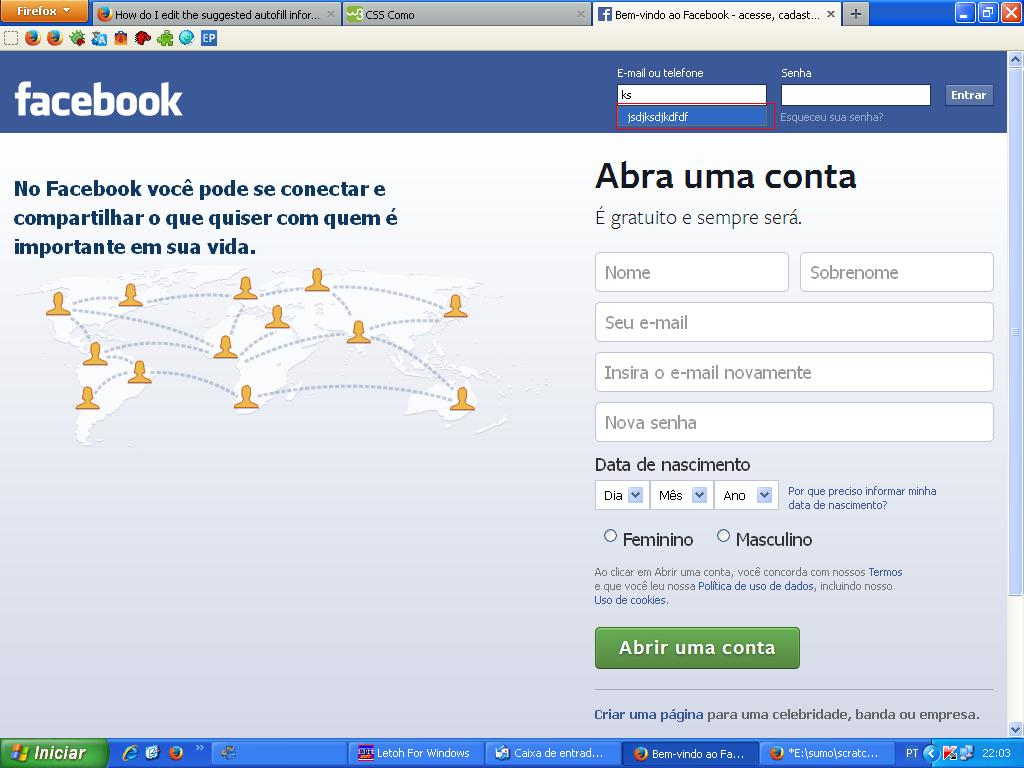
If pressing Delete doesn't remove a suggestion, try Shift+Delete (this may vary between operating systems).
To review, edit, and delete saved form entries in a dialog, you can use an add-on like the following: https://addons.mozilla.org/en-US/firefox/addon/form-history-control/
Solução escolhida
On Mac you need to use Sift+Delete to remove the currently highlighted entry in a drop-down list.
Thank You! That solved it cor-el. Many Thanks.