


How can I restore Google graphic, which I removed some months ago when they tried pushing images?

I would like to restore the Google Doodle to my Google homepage. Some months ago, when Google pushed pictures, there was a way to change a switch in Firefox to keep the pictures from showing. That also switched off the Doodle function. I'd like to know how to find the switch and what setting to use to restore the Doodle. Thanks.
Solução escolhida
You're welcome.
Could you please click the "Solved It" button next to the post which solved the problem for you? This will help others searching for a solution to the same question.
Thanks.
Todas as respostas (6)
Try clicking the Google emoticon in the web address, then click More Information.
In the menu which appears, click Media and then click the Google web address to highlight it.
Then check to see if the box to block the image is checkmarked or not.
I don't know how to find the Google emoticon in the web address. Can you give me a hint?
Thanks.
See screenshot.
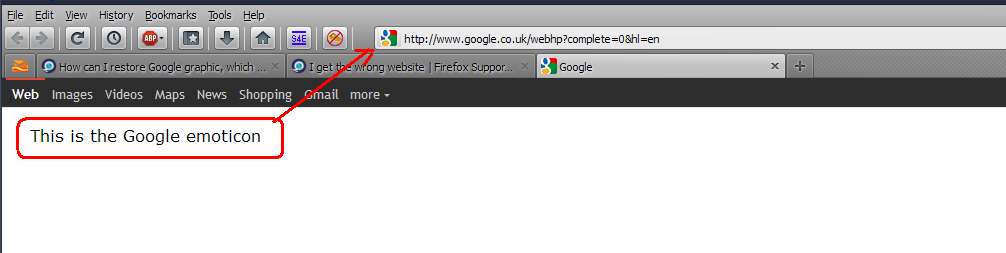
OK. Turns out I had found the emoticon, but when neither the left click nor the right click opens up a "more information" link.
Next?
Thanks for your patience.
I spoke too soon. I was able to open the media box and uncheck a blocked image ilnstruction. Problem solved.
FYI, I was working with an emoticon on a tab instead of the URL web address box.
Tbanks for your help. Problem solved.
Solução escolhida
You're welcome.
Could you please click the "Solved It" button next to the post which solved the problem for you? This will help others searching for a solution to the same question.
Thanks.