


Firefox acting improperly, and what else?

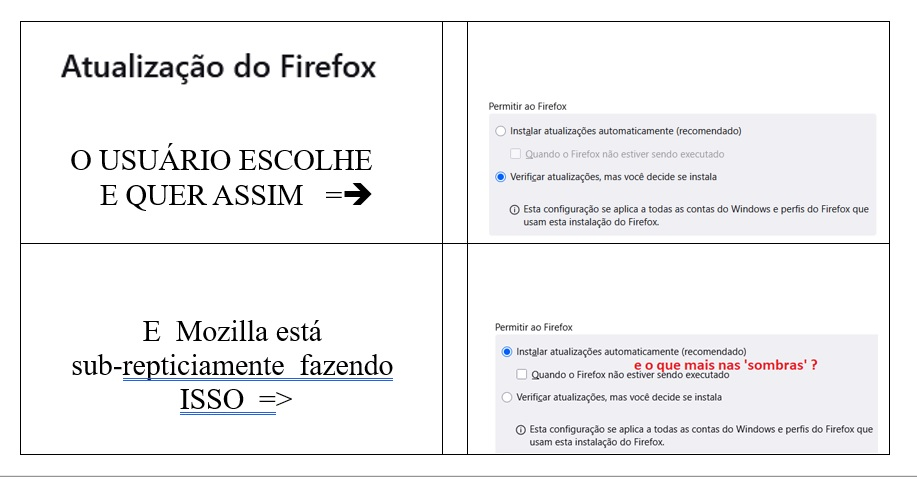
FIREFOX/Mozilla O QUE ?! O Navegador, que sempre usei, PASSOU a... ‘automaticaMente’ ALTERAR a configuração MESMO CONTRARIANDO a opção do usuário !!!
Em: “Atualização do Firefox” / configuração GERAL Apresenta – como sempre o fez e É o justo • Permitir ao Firefox o Instalar atualizações automaticamente (recomendado) Quando o Firefox não estiver sendo executado o Verificar atualizações, MAS VOCÊ DECIDE SE INSTALA
MAS, sub-repticiamente Mozilla ESTÁ PROGRAMANDO – IMPONDO SEM AVISO ao usuário - que ‘instalar atualizações automaticamente’ ACONTEÇA SEMPRE E CONTRARIANDO A OPÇÃO DO USUÁRIO! ENTÃO, o que MAIS, ‘na sombra’... Mozilla pode estar fazendo AO ARREPIO da vontade do usuário ?! Pior é que ao fazer o que está fazendo APAGA TODO “os FAVORITOS” do usuário! CRIANDO ESTRESSE e trabalho ruim. Mozilla está sendo ‘sabotada em Firefox’ OU está mesmo AGINDO SORRATEIRA e prejudicial MENTE?!
OR
FIREFOX/Mozilla WHAT?!
The browser I've always used has started to... 'automatically' CHANGE the settings EVEN AGAINST the user's choice!!!
In: “Firefox Update” / GENERAL settings It shows – as it always has and rightfully so: • Allow Firefox o Install updates automatically (recommended) When Firefox is not running o Check for updates, BUT YOU DECIDE WHETHER TO INSTALL
BUT, surreptitiously Mozilla IS PROGRAMMING – IMPOSING WITHOUT WARNING to the user - that 'installing updates automatically' ALWAYS HAPPENS AND AGAINST THE USER'S CHOICE!
SO, what ELSE, 'in the shadows'... might Mozilla be doing AGAINST the user's wishes?!
What's worse is that by doing what it's doing, it DELETES ALL of the user's "FAVORITES"! CREATING STRESS and bad work.
Is Mozilla being 'sabotaged in Firefox' OR is it really ACTING SNEAKY and maliciously?!
Todas as respostas (1)
Hello Thomas_Earp, I understand your frustration,having your browser settings change unexpectedly and losing favorites is genuinely stressful. Let me help you work through this,
Regarding Update Settings: Firefox does have update preferences that should respect your choices. If they're reverting, this could be:
   A bug in a recent update (these do occasionally happen)
   A profile corruption issue
   An enterprise policy being applied (sometimes IT policies override user settings)
You can try:
   Going to about:config and checking for any policies that might override settings
   Creating a new Firefox profile to see if the issue persists
   Checking about:policies to see if any organizational policies are active
Regarding Favorites/Bookmarks Deletion: This is more serious and shouldn't happen normally. Firefox typically preserves bookmarks across updates. Possible causes are:
   Profile corruption during the update process
   Sync issues if you use Firefox Sync
   Accidental profile switching
i recommend you before doing an update of firefox Backup your bookmarks now. Bookmarks → Library → Import and Backup → Export Bookmarks to HTML
Firefox is open source, which means the code is publicly auditable. That said, bugs and unintended behaviors can occur without malicious intent. The open-source nature does allow community scrutiny, which is a good safeguard, mozilla does not "hide" or have "shadows" behind it. even you can check the source code. I'd recommend filing a detailed bug report at Bugzilla (bugzilla.mozilla.org) with:
   Your Firefox version
   Operating system
   Exact steps that led to the issue
   Screenshots if possible
This helps Mozilla investigate whether it's a widespread bug or isolated case.