


Temporarily stop retrieval of an email address.
I use Thunderbird to handle my two email addresses. I recently added my wife's address to use temporarily while we fixed a problem with her laptop. Now she is using her laptop again and I want to stop the retrieval of her emails. I could just delete her account information but I would like to just switch it off, in case it is needed at a later date.
Is there an easy way to do this?
Todas as respostas (5)
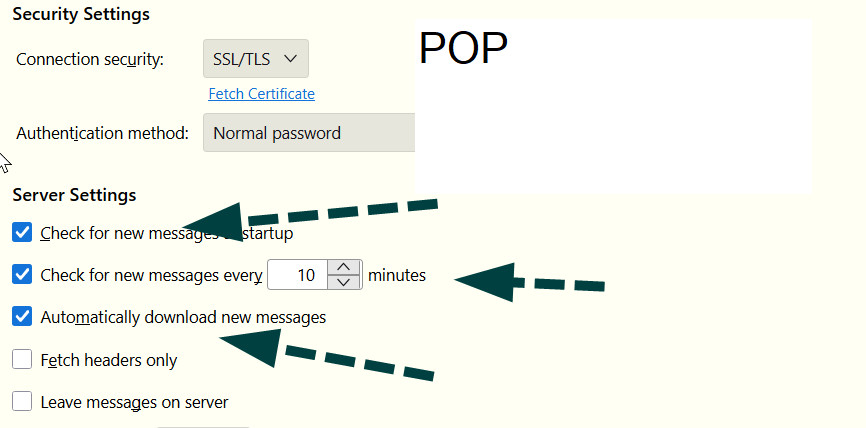
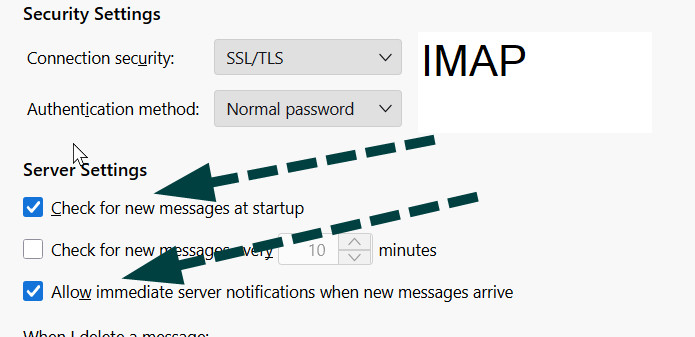
- click to account settings pane - click the 'server settings' pane for her account - if POP, uncheck the boxes for checking and downloading mail - if IMAP, uncheck the boxes for checking for messages and the box to allow immediate server notification
IMAP cannot be guaranteed, as some IMAP servers will show incoming mail regardless
Sidenote: I have read snippers here and there that indicate the feature is being considered for a future release. But I'm not one who would know for sure.
Thankyou for the response to my question. I don't see any ticked boxes to untick. I guess I will just have to delete her account and if we need it again I will have to try to set it up again from scratch. It wasn't easy the first time because hers is a webmail account with Yahoo.
Well, I'm surprised, as such boxes are normally checked. See attached for IMAP and POP
I have found both of those places on her account settings but none of the boxes are ticked. And messages are still coming in. A real mystery.
My guess is that it's an IMAP account. The server is always 'live.'