


Firefox behavior

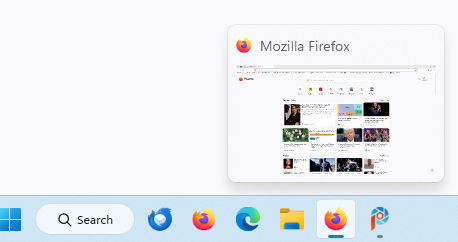
Firefox is the default browser and pinned to the taskbar. When clicked, Firefox automatically opens places an additional icon in the taskbar. Once Firefox opens, in the second icon, any new links open in tabs, which is my preference.
The first image is the pinned icon in the taskbar. When hovering it only displays Firefox. The second image is the additional icon, when hovering over this icon the active page thumbnail is displayed.
Prior versions of Firefox did not have this behavior on my Windows 11 desktop PC. I've tried various settings in about:config but cannot resolve this issue. Is there some reason two icons are now required in the taskbar when running Firefox?

Solução escolhida
Please delete or mark as solved, I found the solution after more searching. Started Firefox from the pinned task bar icon. Then deleted the original pinned taskbar Firefox icon. Right clicked the open Firefox icon on the task bar and selected pin to task bar. Everything now works perfectly!
Ler esta resposta 👍 0Todas as respostas (1)
Solução escolhida
Please delete or mark as solved, I found the solution after more searching. Started Firefox from the pinned task bar icon. Then deleted the original pinned taskbar Firefox icon. Right clicked the open Firefox icon on the task bar and selected pin to task bar. Everything now works perfectly!