


Windows 10 reached EOS (end of support) on October 14, 2025. If you are on Windows 10, see this article.

Pesquisar no site de suporte

Evite golpes de suporte. Nunca pedimos que você ligue ou envie uma mensagem de texto para um número de telefone, ou compartilhe informações pessoais. Denuncie atividades suspeitas usando a opção “Denunciar abuso”.

Saiba mais
Esta discussão foi arquivada. Faça uma nova pergunta se precisa de ajuda.
Arquivado

1Password icon does not show in toolbar

Mark replied
cdocksey

Hi. Sometime over the last day or so I started having a problem with my 1Password Password Manager, an extension to Firefox that imports my ID and password to websites that require them. I am running Mac OS 15.4.1 and Firefox 138.0.3. Up to now it was enough to click on the 1Password icon on the right of the first "email" box. But now I get a popup saying "Press the 1 Password icon in your browser's toolbar to unlock". But I cannot find that icon in my Firefox browser. I assume it is a Firefox problem because I do not have the same problem when using Safari and 1Password. Help appreciated, ChrisD
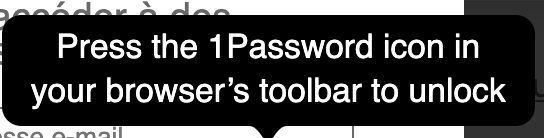
Hi. Sometime over the last day or so I started having a problem with my 1Password Password Manager, an extension to Firefox that imports my ID and password to websites that require them. I am running Mac OS 15.4.1 and Firefox 138.0.3. Up to now it was enough to click on the 1Password icon on the right of the first "email" box. But now I get a popup saying "Press the 1 Password icon in your browser's toolbar to unlock". But I cannot find that icon in my Firefox browser. I assume it is a Firefox problem because I do not have the same problem when using Safari and 1Password. Help appreciated, ChrisD
Capturas de tela anexadas

Todas as respostas (1)

Could you please check if the 1Password Password Manager can be found by clicking on the Extensions icon on the toolbar? (puzzle piece)

If you can, press it. That should unlock the password manager.

If it would be more convenient, you can also click on the settings on the right of each extension in the extension panel for an option to pin the extension to the toolbar.