


What does Manage Identities use to log in?

My overall goal is to be able to receive email from 6 different addresses into one email account (the only one with email storage), and also to be able to send email that will appear to be from any of the 6 email addresses I choose. This is so I don't have to look at the mailboxes for 6 email accounts for new mail, and so all the email is consolidated for reading and managing in Thunderbird.
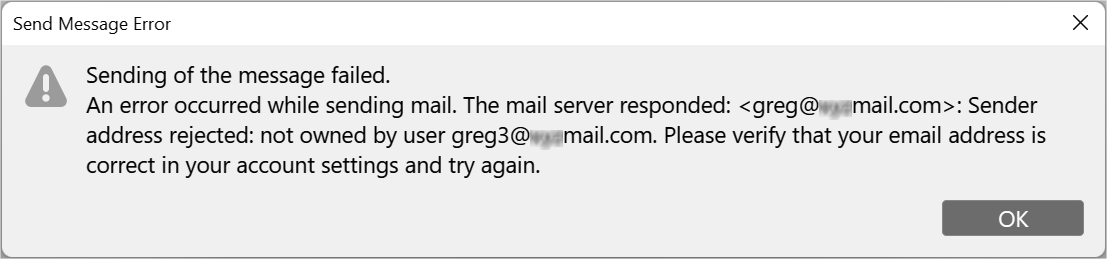
I used to use Manage Identities (needing only 1 SMTP login) with no problems with my previous hosting provider (Hostgator), but it doesn't work with my new hosting provider (Hostinger). I get the error message in the below attachment. It appears that their SMTP server (smtp.titan.email) does not allow the sending (presumably "From") address to be different than the SMTP server login address, but I just wanted to confirm: Is Thunderbird really trying to log into the SMTP server with the email specified in the Managed Identity entry and not any other address (e.g., the spoofed address)? Correct me if I'm wrong, but that means that their SMTP server doesn't allow spoofing, but gmail and Hostgator do, right?
Solução escolhida
Thanks for the info. I no longer need an answer to my questions.
Ler esta resposta 👍 0Todas as respostas (4)
One option is to set up individual accounts and use the unified feature of TB, allowing multiple accounts to appear as being one input and one output. A strength of that is you can quickly restore to separate accounts with a single click. However, on your question, yes, the identities feature allows that, but you need to still specify separate smtp servers to avoid spoofing.
> but you need to still specify separate smtp servers to avoid spoofing.
Do you mean: specify separate email addresses to the SMTP server to avoid its spoofing detection?
Having specific smtp servers, unique to each account, eliminates the possibility of spoofing, which is preferred.
Solução escolhida
Thanks for the info. I no longer need an answer to my questions.