


Firefox 89.0 crashes instantly when opening: https://globe.adsbexchange.com/

Hi,
For a long time, Firefox has been crashing when I try to open the ADS-B website for tracking aircraft.
This problem is intermittent.
ADS-B is a huge aviation safety improvement.
Because tracking of military aircraft is often prevented, I attributed the crashing to a crash signal from military aircraft departing the nearby airport.
There are privacy concerns that have led to a new system for ADS-B.
There is also an unrelated FAA-offered blocking feature for radar tracking which allows aircraft owners to block radar data from being viewed by the general public.
Today I learned that it is impossible to paste anything to the Mozzila Crash Reporter block.
I haven't found a way to see any relevant crash report info in the Activity Monitor feature.
I haven't updated Firefox to the newest yet because the last time I upgraded I found that the appearance of the tab bar had been changed, and it took too long for me to return to the desired previous appearance.
It is often not easy to go back to a previous Firefox edition.
I understand the need to solve problems via upgrades, especially security problems, but now our late 2013 Macbook Pro Retina is stopped at OS 13.6, and perhaps also stopped at Firefox 99.0.1?
Perhaps security fixes will soon be impossible.
Thanks for your consideration.
Rich Wright
Todas as respostas (5)

In the address box, type about:crashes<enter>. Note: If any reports do not have BP- in front of the numbers/letters, click it to submit them.
The crash report is several pages of data. We need the report numbers to see the whole report.
Using your mouse, mark the most recent 7 - 10 Submitted crash reports, and copy them. Now go to the reply box and paste them in.
Please, Do not post a screenshot ! !
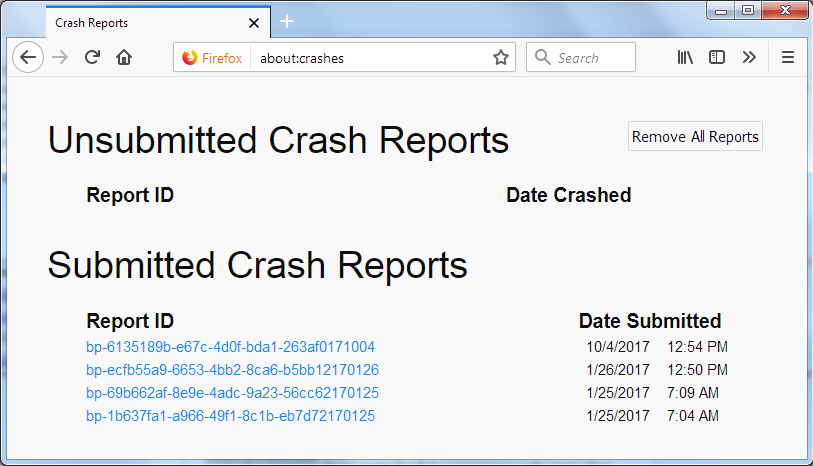
For more help on crash reports, see; https://support.mozilla.org/en-US/kb/firefox-crashes-asking-support +++++++++++++++++++++++++++ If you can't get Firefox to open, you will have to do this the hard way. https://support.mozilla.org/en-US/kb/mozillacrashreporter
Open the file browser / explorer on your computer. Note: You may have to enable Show Hidden Folders / Files. Enter this in the address box;
Windows: %APPDATA%\Mozilla\Firefox\Crash Reports\submitted Win 7/Vista: C:\Users\<username>\AppData\Roaming\Mozilla\Firefox\Crash Reports\submitted Win XP/2000: C:\Documents and Settings\<username>\Application Data\Mozilla\Firefox\Crash Reports\submitted Win 10: Press <Windows> + R on the keyboard. A Run dialog will open. In the Run dialog, type %APPDATA%\Mozilla\Firefox\Crash Reports\submitted <Enter>
Mac OS: /Users/<username>/Library/Application Support/Firefox/Crash Reports/submitted
Linux: /home/<username>/.mozilla/firefox/Crash Reports/submitted
Copy the most Recent 5-7 File Names in the folder. Press the Reply button. Now go to the reply box and paste them in.
harbor693 said
I haven't updated Firefox to the newest yet because . . .
I understand how you feel. I didn’t like where Firefox Quantum was going. So, I stopped updating at v54. So far, no real issues. And I still have my Legacy add-ons.
I have noticed, however, that some websites don't work properly.
I have several versions of Firefox, including the current (99.0.1), and had no problem.
I had the webpage open in the current Firefox (99.0.1) for some time without issues.
Can you describe in detail how the crash happens?
Could be a problem with WebGL.
Start Firefox in Troubleshoot Mode to check if one of the extensions ("3-bar" menu button or Tools -> Add-ons -> Extensions) or if hardware acceleration or userChrome.css is causing the problem.
- switch to the DEFAULT theme: "3-bar" menu button or Tools -> Add-ons -> Themes
- do NOT click the "Refresh Firefox" button on the Troubleshoot Mode start window
- https://support.mozilla.org/en-US/kb/diagnose-firefox-issues-using-troubleshoot-mode
- https://support.mozilla.org/en-US/kb/troubleshoot-extensions-themes-to-fix-problems
You can create a new profile as a quick test to see if your current profile is causing the problem.
See "Creating a profile":
If the new profile works then you can transfer files from a previously used profile to the new profile, but be cautious not to copy corrupted files to avoid carrying over problems.