Esta discussão foi arquivada.
Faça uma nova pergunta se precisa de ajuda.

Arquivado
Screen Share pop up doesn't show up
Hello, I have a problem with the screen share pop up that appears when a website tries to access the screen. When I try to share the entire screen on Google Meet, as soon as I click Share screen > Full screen, the button grays out and nothing is shared. The pop up that allows you to select the screen to share never opens.
The only way to reset Meet's "Share screen" button is by exiting and joining the Google Meet room again. I've checked that meet.google.com's screen permission is set to "Always ask" and not "Blocked". How can I fix this problem?
Hello, I have a problem with the screen share pop up that appears when a website tries to access the screen. When I try to share the entire screen on Google Meet, as soon as I click Share screen > Full screen, the button grays out and nothing is shared. The pop up that allows you to select the screen to share never opens.
The only way to reset Meet's "Share screen" button is by exiting and joining the Google Meet room again. I've checked that meet.google.com's screen permission is set to "Always ask" and not "Blocked". How can I fix this problem?
Todas as respostas (1)

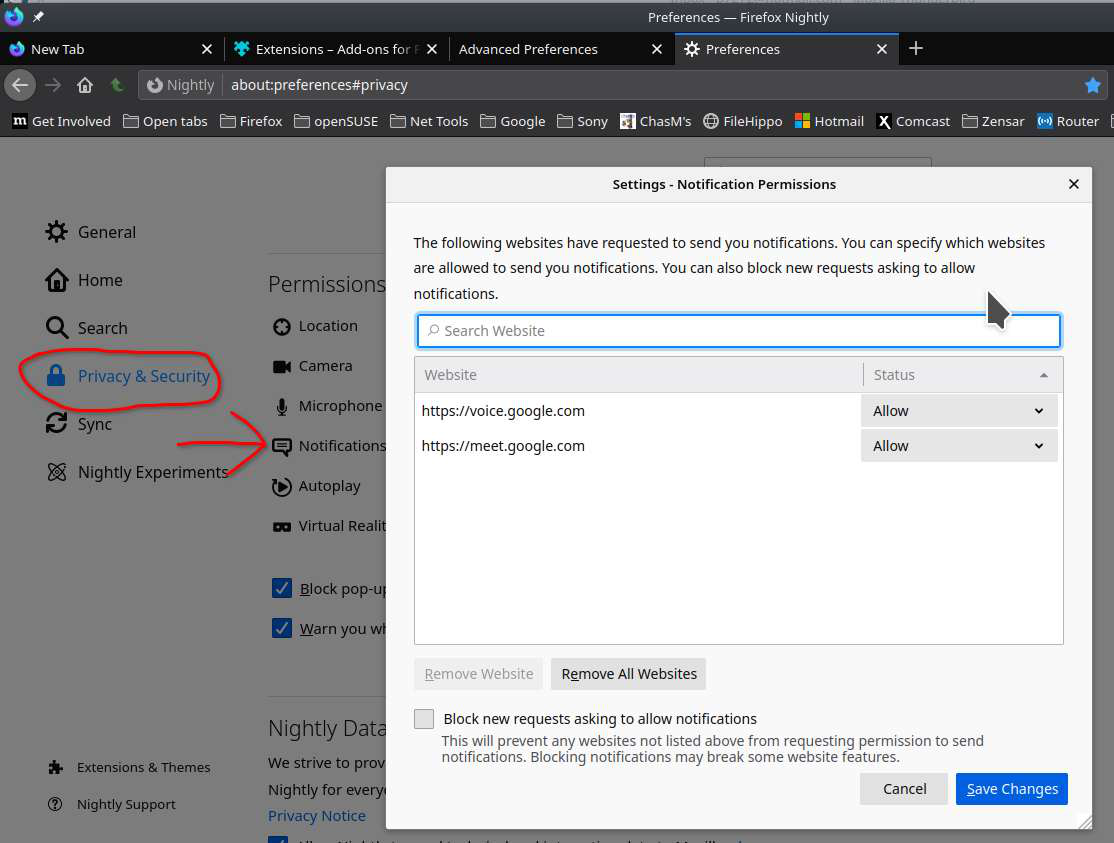
Did you check the notifications area to see that meets.google.com is in there? see screenshot If so, try removing it and going through the process again.