


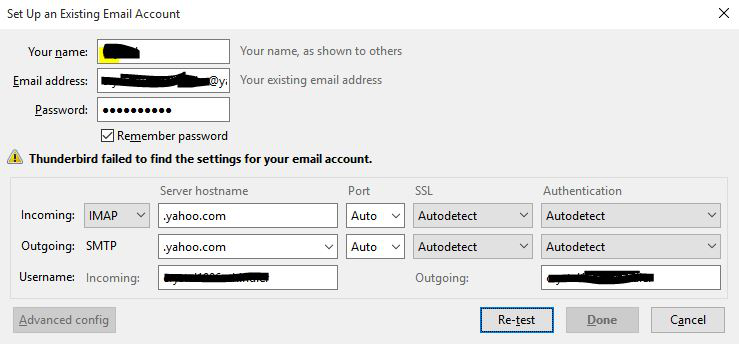
thunderbird failed to find the settings for your account
Since yesterday, i keep getting this message whenever i try to Set Up an Existing Email Account with Thunderbird. My email provider is Yahoo, and although i enter the correct imap and smtp details, it still gives me the same error. I also tried with Advance settings and selecting the Yahoo certificate, but still not working. I have tried almost everything out there, please help! Allow less secure apps is enabled in my yahoo account.
Todas as respostas (9)
given yahoo is ion the Thunderbird database. That message is almost certainly your antivirus/firewall blocking Thunderbird from actually downloading the settings. A very common situation when you have anti virus / firewall products that are closer to net nannies.
Check and correct the anti virus/ Firewall.
I checked both Anti virus and firewall. I have disabled the windows antivirus and allowed thunderbird in windows firewall, and still the same problem...
Restart the operating system in safe mode with Networking. This loads only the very basics needed to start your computer while enabling an Internet connection. Click on your operating system for instructions on how to start in safe mode: Windows 10, Windows 8, Windows 7, Windows Vista, Windows XP, OSX
- If safe mode for the operating system fixes the issue, there's other software in your computer that's causing problems. Possibilities include but not limited to: AV scanning, virus/malware, background downloads such as program updates.
It seems that it's happening only with Yahoo accounts. I tried adding a gmail account and it worked...any rumours on this?
Your picture shows incomplete entries for the server names. The incoming IMAP server is imap.mail.yahoo.com on port 993, SSL/TLS security. The outgoing SMTP server is smtp.mail.yahoo.com on port 465, SSL/TLS security.
https://help.yahoo.com/kb/mail/sln4075.html
http://kb.mozillazine.org/Yahoo
The authentication can be 'normal password' if you enter an app password, but I think you can also use OAuth2 authentication now for Yahoo (works for AOL, which is based on Yahoo) and enter the normal account password. I don't have a Yahoo account to test this, but it's worth trying. If you used OAuth when setting up gmail, the process should look the same with Yahoo.
I do not see an entry for yahoo in the database. https://autoconfig.thunderbird.net/v1.1/ I will see if I can find outmore.
Apparently Houston we have a problem.
It is not just Yahoo, but someone is looking at the entries and that part of things should be fixed in the near future.

Trying not unnecessarily start a new thread but, had a similar problem with converting two email addresses on Spectrum to IMAP. Created the first mailbox from an existing account, and, after fixing the incorrect server hostnames that pushed out, it worked. When I tried to set up the second, the same way I got this: Thunderbird failed to find the settings for your email account. Naturally, Spectrum claims it's Thunderbird's problem, not theirs.
Alterado por allpro1 em
allpro1 said
Trying not unnecessarily start a new thread
I think you should. The issue in this topic was resolved within days of my last post.