


No spellcheck, especially in Yahoo Mail
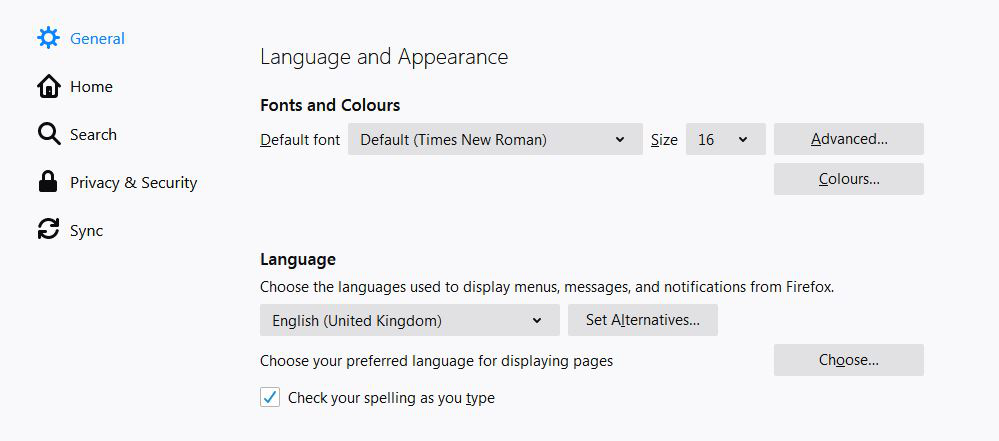
Have just loaded Firefox, getting fed up with Basic Yahoo Mail in Internet Exporer. But unlike IE the spellcheck in Firefox doesn't seem to be active. I attach a jpg of my spellchecking option. Have I set it up wrongly?
Solução escolhida
Do you have a dictionary installed and selected?
The spelling checker is enabled if [X] "Check Spelling" in the right-click context menu has a checkmark. You can see which dictionary is selected if you right-click in a text area and open the Languages sub menu. At least one dictionary should be installed and have a check mark to indicate that it is selected.
- open the "Add Dictionaries" link to install a dictionary if you do not have one.
You can enable or disable spell checking globally:
- Options/Preferences -> General: Browsing: "Check my spelling as I type"
You can look here for dictionaries:
Note that you need a dictionary and not a language pack that provides string translations for the user interface.
Ler esta resposta 👍 1Todas as respostas (1)
Solução escolhida
Do you have a dictionary installed and selected?
The spelling checker is enabled if [X] "Check Spelling" in the right-click context menu has a checkmark. You can see which dictionary is selected if you right-click in a text area and open the Languages sub menu. At least one dictionary should be installed and have a check mark to indicate that it is selected.
- open the "Add Dictionaries" link to install a dictionary if you do not have one.
You can enable or disable spell checking globally:
- Options/Preferences -> General: Browsing: "Check my spelling as I type"
You can look here for dictionaries:
Note that you need a dictionary and not a language pack that provides string translations for the user interface.