


firefox taking up huge memory and not loading streaming video

Firefox appears to crash anything, or really hinder things like after effefcts. I load brave browser, or chrome, and they do no cause the apps to crash. firefox is eating memory as of 64.0 and this is a shame.
I also cannot stream now, I get numerous codec/compatibility errors, but loading the same url into brave, works.
I am not a fan of chrome, so brave falls into that, and firefox is my choice.. but so many problems since the change to web extensions. I'm just not convinced this is my browser any more.
Todas as respostas (1)
We're sorry to hear that Firefox is crashing. In order to assist you better, please follow the steps below to provide us crash IDs to help us learn more about your crash.
The crash report is several pages of data. We need the report numbers to see the whole report.
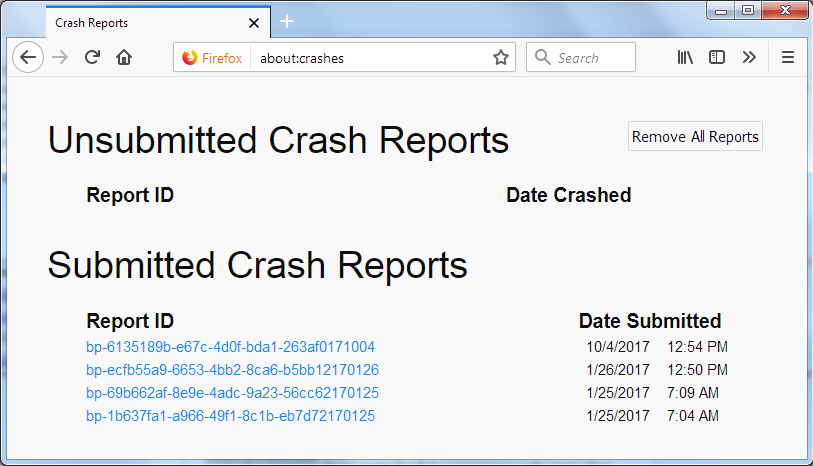
- Enter about:crashes in the Firefox address bar and press Enter. A list of Submitted/Unsubmitted Crash Reports will appear, similar to the one shown below.
- Copy the 5 most recent Submitted Report IDs that start with bp- and then go back to your forum question and paste those IDs into the "Post a Reply" box.
Note: If a recent Report ID does not start with bp- click on it to submit the report.
(Please don't take a screenshot of your crashes, just copy and paste the IDs. The below image is just an example of what your Firefox screen should look like.)
Thank you for your help!
More information and further troubleshooting steps can be found in the Troubleshoot Firefox crashes (closing or quitting unexpectedly) article.