Firefox 64-bit does not free memory in Windows 7

Firefox (63.0.3 64-bit on Windows 7) has been sluggish, so I checked its memory usage:
firefox.exe 123772 Console 1 356,932 K firefox.exe 112860 Console 1 90,084 K firefox.exe 77480 Console 1 172,728 K firefox.exe 123444 Console 1 237,464 K taskmgr.exe 37892 Console 1 10,688 K firefox.exe 26724 Console 1 385,768 K firefox.exe 65040 Console 1 45,860 K
Clicking "Minimize memory usage" in about:memory does not have much effect:
firefox.exe 123772 Console 1 312,968 K firefox.exe 112860 Console 1 89,972 K firefox.exe 77480 Console 1 170,840 K firefox.exe 123444 Console 1 198,584 K firefox.exe 26724 Console 1 295,812 K firefox.exe 65040 Console 1 45,872 K
Neither does clearing the cache and restarting.
Todas as respostas (3)
Restarting Windows cuts it down some but it still seems excessive given that I have restore session disabled.
firefox.exe 4544 Console 1 237,748 K
firefox.exe 5768 Console 1 52,528 K
firefox.exe 5148 Console 1 168,292 K
firefox.exe 6256 Console 1 243,072 K
firefox.exe 6616 Console 1 47,672 K
It's common to see 5-7 firefox.exe processes in the Task Manager.
On the Processes tab of the Windows 7 Task Manager you can use View > Select columns to add the Command Line column. That allows you to distinguish the main process, content process(es), and possible extension process(es). Tabs are assigned to different content processes, but I don't know how Firefox decides which one to use.
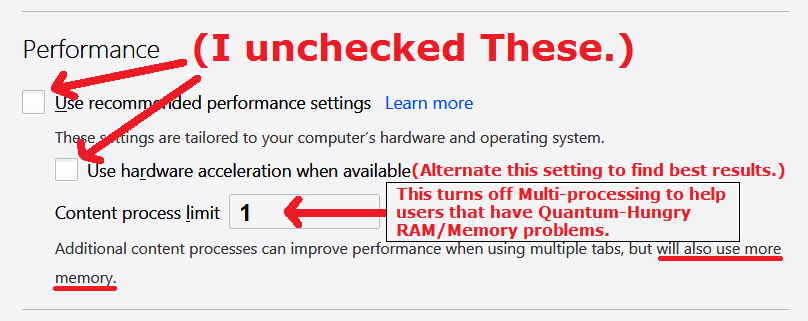
There is an option to reduce the number of content processes. See: Firefox's performance settings. I don't know whether that reduces overall memory consumption by very much, but it avoids whatever overhead is associated with additional content processes.
I don't have an idea of what should be considered normal memory use, but I'm attaching a screenshot of what I see with 9 windows each containing numerous tabs, some restored (but not reloaded) and others actively navigated since my last Firefox restart. Seems like about 3GB in total?
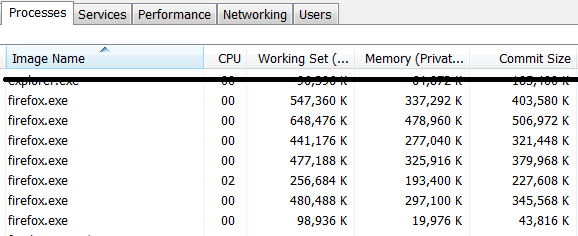

I got 2.8GB with 4 firefox.exes at the moment. This is from a fresh start of my computer and FF earlier today. (5 1/2 hours computer up-time with about 5 hours of FF up-time. 11 Browser Windows - Main Browser Window has 909 Tabs - only a handful are loaded.)
I made a new, manual Paging File Size for my Windows 7 Pro SP1 today. Highest ever, at 14GB/14GB. (Got bad performance rather quickly at 7GB.)
What I found was, the Paging File Size does not always sit at recommended size if in 'Auto' sized mode. My system says to have a little over 12GB, but it was only at a little over 8GB in the 'auto' size setting mode.
I believe others out there having performance/memory issues might want to check their Paging File Size setting in Windows and remaining HDD space should be in the hundreds of GB... not near or under 100 GB!
I may revisit the FF Performance settings again. Current Settings I have are these:
~Pj (on a Nov 2010 Desktop, Windows 7 Pro SP1, 8GB Memory, Nov 2010 video card - nothing heavy duty, for back then.)