


What does dom.maxHardwareConcurrency 16 Mean

What does dom.maxHardwareConcurrency 16 mean?
Solução escolhida
Just leave the pref(s) at their default value. This is not an important feature and best is usually not to modify prefs unless there is a problem with some feature.
Ler esta resposta 👍 1Todas as respostas (13)
See:
- https://developer.mozilla.org/en-US/Firefox/Releases/48#DOM_HTML_DOM
- https://developer.mozilla.org/en-US/docs/Web/API/NavigatorConcurrentHardware
https://dxr.mozilla.org/mozilla-release/source/modules/libpref/init/all.js#5664
// return the maximum number of cores that navigator.hardwareCurrency returns
pref("dom.maxHardwareConcurrency", 16);
Thank you.
It looks like it means the number of threads that can be run at the same time. In my case 16. Presumably this means 1 to 16. Am I correct?
The pref defines a maximum of how many logical cores for workers are available. If you have a configuration that supports more logical cores then Firefox will report the maximum as set via the pref.
You can inspect the current setting via the navigator object in the Web Console.
- window.navigator.hardwareConcurrency
If you regularly would visit website that makes excessive use or workers then you may want to set this pref to a lower value.
I do not see this (window.navigator...) in about:config
I see: dom.maxHardwareConcurrency 16
I do not co-work
window.navigator is not in about:config, but is JavaScript code that you can run in the Web Console like I wrote above.
- "3-bar" menu button or Tools -> Web Developer
- https://developer.mozilla.org/en/Tools/Web_Console
I am lost
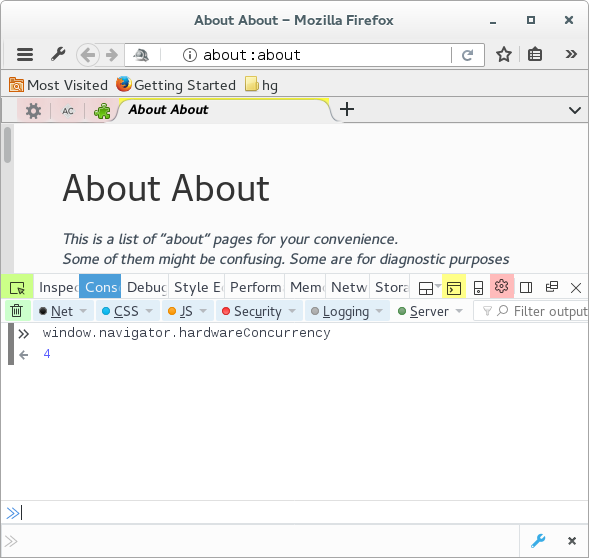
Are you able to open the Web Console (Ctrl+Shift+K)?
On its command line (>>) you can paste the JavaScript code. Press the Enter key to evaluate the code and see the result.
- window.navigator.hardwareConcurrency
Alterado por cor-el em
I could not find the command line, but, with your help, I have found it >>.
I see: window.navigator.hardwareConcurrency 2
So, it looks like two people could work at the same time. However, I work alone. Does this mean the processor has two cores for independent processing?
Best wishes
PS. Does the command line look at all JavaScript code in the Firefox browser, or all JS code in kubuntu (my OS). Does this command line have other functions?
PS in about:config it is set to 16! (dom.maxHardwareConcurrency 16)
dom.maxHardwareConcurrency sets the maximum, so if you would have a very sophisticated CPU that would support 32 cores then websites can only use 16. What navigator.hardwareConcurrency reports is what websites detect and what is safe to use.
If you set dom.maxHardwareConcurrency to 1 and close and restart Firefox then you will see that navigator.hardwareConcurrency will report 1.
I have an old pc and the processor is basic. I believe that it is dual core,
Would you advise changing the HardwareConcurrency in about:config to 2, or leave it at 16.
Thanks
Solução escolhida
Just leave the pref(s) at their default value. This is not an important feature and best is usually not to modify prefs unless there is a problem with some feature.
Thank you for all the help.
Best wishes.