


Sending to a list not working

I have sent to contact lists for decades, but now I get an error message that us not in the correct form.
Solução escolhida
I'd rebuild the relevant address book. Export it to LDIF, delete the original, re-import the LDIF. But I'm interested to know where Matt is going with this one.
My suspicion is that the address book data file is corrupted. One test would be to try to add a new Contact to the address book. If it doesn't "take", i.e. the added Contact vanishes after a restart of Thunderbird, then we have evidence that it can't be edited, another symptom of corruption.
Note that a List is contained entirely within its parent address book and has no independent existence, which is why i am going on about fixing the address book and not the List.
Ler esta resposta 👍 0Todas as respostas (9)
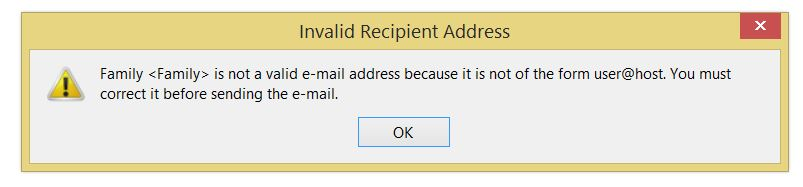
What is the error message? verbatim please.
See image below.

I tried to sign in with my user name "joe6966" and it said that it was taken, and would not send a new password, even though I know the password. I also have used "joeh6966" before, and that will not work now, even though it is taken. So, that is why I added "fuck" to make a new user name.
can you get mail on the account?
yes, I received this reply in TB.
Solução escolhida
I'd rebuild the relevant address book. Export it to LDIF, delete the original, re-import the LDIF. But I'm interested to know where Matt is going with this one.
My suspicion is that the address book data file is corrupted. One test would be to try to add a new Contact to the address book. If it doesn't "take", i.e. the added Contact vanishes after a restart of Thunderbird, then we have evidence that it can't be edited, another symptom of corruption.
Note that a List is contained entirely within its parent address book and has no independent existence, which is why i am going on about fixing the address book and not the List.
My solution was to make a new <Family> list, along with a new <Friends> list. I knew that would work because my other lists were working. They got corrupted because a few days ago, I made a new list called <All>, and put the Family and Friends lists in it. When I tried to send using <All>, it didn't send and that corrupted the 2 other lists. All is well now. Thanks.
Ah, yes, you cannot nest Lists. But I'd hope that it simply wouldn't work, rather than breaking things. :-(
I created 2 new lists with a "2" at the end, as in <Friends2>. Then I deleted the first corrupted lists. After that I renamed the lists with a 2 back to the original name. I got the same results; same error message, so I went back to with a 2. Now, when I try to send to a list, I get 2 choices, one of which was deleted but it is not really deleted. Is this clear?