


Will thunderbird work with outlook.com after june?

Microsoft is kicking Windows Live Mail to the curb next month in it's latest attack on our privacy.
Question: Will I be able to use Thunderbird to send and receive mail with my current hotmail accounts after this happens?
Todas as respostas (4)
Another user posted a similar question. https://support.mozilla.org/questions/1121590
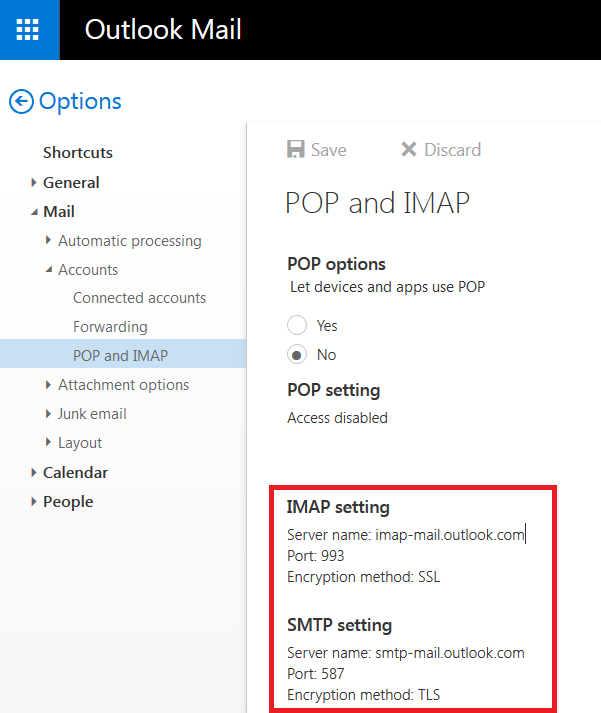
As far as I can tell, Microsoft will still allow IMAP access to Outlook Mail (the new platform for Hotmail/Live/Outlook.com mail). The settings can be found in the Options panel of your online account (screen shot attached).
Note: IMAP doesn't sync calendars, just mail. I don't know whether the Lightning add-on to Thunderbird can sync with Outlook calendars.
Thank you,
I haven't installed Thunderbird yet and hadn't even thought about the calendar.
You read my mind.
Alterado por MadeUpName30 em

Hello jscher2000 -- 'newbie' here; sorry 2 bother. Don't know how to 'post a question' to general Thunderbird Forum. N e way; been using T-bird for several months [on win7 pro] b/c MSFT won't support hotmail/Windows Live n e more (as u know). Am very happy w/T-bird EXCEPT: running Rev 45.2; I have TWO e-mails 'listed' under accounts; I use BOTH frequently. abcde@hotmail.com; and fghij@hotmail.com. Now, abcde is marked as 'default' account. And messages come in properly and go to 'INBOX' or 'JUNK' [as appropriately]. Send/receive all work fine. HOWEVER, 2nd account [ fghij@hotmail.com ], ANY/ALL messages come into 'JUNK', ONLY. When I look at tools -> account settings -> manage identities --- EACH account shows each e-mail correctly as default. HOWEVER, on/in main 'Account Settings' page, just above 'manage identities' box is the 'Outgoing Server (SMTP):' drop-down box for the 'abcde@hotmail.com' account, it shows : Outlook.com (Microsoft) - smtp-mail.outlook.com (Default). BUT, for the 2nd account, [ fghij@hotmail.com ], that drop-down box has SAME EXCEPT it has NO ' (Default) '. I will be happy to send you SS, but cannot find methodology here on this board. My e-mail [that seems to be working] is: <@hotmail.com>; The 'other one' is: <@hotmail.com>. Sorry to be stupid & a PITA !!!! THX for ur help in advance. Douglas Gardner - USA
Alterado por Andrew em
Hi Douglas, this really does seem like a different question, at bottom, why would all messages from an account go into the JUNK folder? It's not a question I would know anything about, unfortunately.
You can start a new question using this link:
https://support.mozilla.org/questions/new/thunderbird/fix-problems
Please scroll down past the suggested articles to continue with the form (it has two or three sections).