


How do I remove / delete an email account from Thunderbird?

My gmail account is a catch all for certain email accounts so I do not need to have them individually on Thunderbird. To keep from getting multiple copies of the same emails - how do I REMOVE/DELETE/CLOSE an email account on Thunderbird?
Todas as respostas (5)
Solução escolhida
Select the unwanted account in the left-hand Folder Pane. Right-click it, select "Settings".
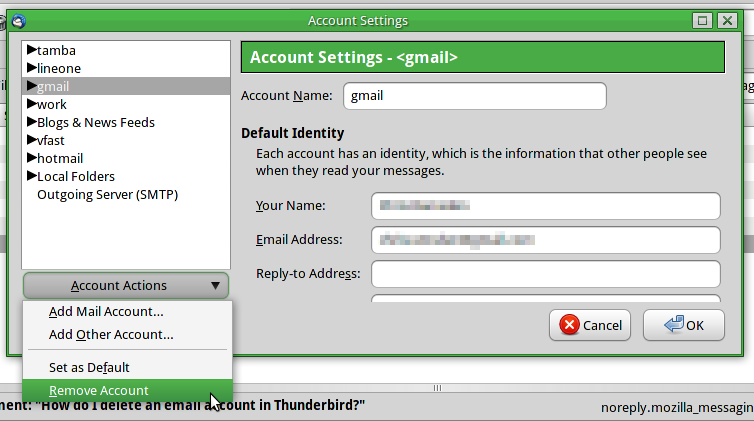
The Account Settings pane will appear, with the chosen account highlighted. At the bottom of the pane is a button labelled Account Actions, which when clicked will reveal an option to Remove Account. You can select and remove as many accounts as you wish, but note that you won't be permitted to remove the default account. You must first designate another account as the default.
That worked. Thank you.
fbxmaid said
My gmail account is a catch all for certain email accounts so I do not need to have them individually on Thunderbird. To keep from getting multiple copies of the same emails - how do I REMOVE/DELETE/CLOSE an email account on Thunderbird?
I followed these directions and they don't work; I right clicked the account I want to delete but nothing called settings showed up.
It says RIGHT click the account.
Figured out how to delete it. Thanks to all who offered advice.