


Why Are There Doubles of Everything in "Show All Bookmarks"?

I open my Bookmarks library and there's doubles of everything.
I see:
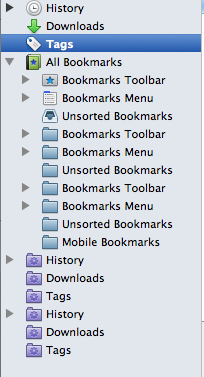
History (with the clock icon) Downloads (with the down arrow) Tags (with the tag icon) All Bookmarks (with the book icon)
      Bookmarks Toolbar (star icon)
      Bookmarks Menu (menu icon)
      Unsorted Bookmarks (tray icon)
      Bookmarks Toolbar (blue folder)
      Bookmarks Menu (blue folder)
      Unsorted Bookmarks (blue folder)
      Bookmarks Toolbar (blue folder)
      Bookmarks Menu (blue folder)
      Unsorted Bookmarks (blue folder)
      Mobile Bookmarks (blue folder)
History (purple folder icon) Downloads (purple folder icon) Tags (purple folder icon) History (purple folder) Downloads (purple folder) Tags (purple folder)
I would like to get rid of the doubles but I can't delete them. (Right-clicking gives a greyed out option to delete.)
I recently restored my phone and laptop both to factory settings but I can't remember if I signed out of sync or not.
If this is why there's doubles, how do I get rid of them?
Thanks!
Solução escolhida
Fixed it.
I deleted the firefox folder in Library > Application support > Firefox
I deleted my firefox sync account.
I reinstalled firefox.
I made a new firefox sync account.
Not fun. Chrome is looking pretty good right now.
Todas as respostas (4)
Here's a pic.
We have seen more reports that Sync can cause issues with bookmarks getting corrupted. You will have to disconnect Sync and repair the bookmarks.
You can check for problems with the places.sqlite database file in the Firefox profile folder.
- http://kb.mozillazine.org/Bookmarks_history_and_toolbar_buttons_not_working_-_Firefox
- https://support.mozilla.org/kb/Bookmarks+not+saved#w_fix-the-bookmarks-file
- Places Maintenance: https://addons.mozilla.org/firefox/addon/places-maintenance/
I need to disconnect sync.
Then what should I do?
I'm sorry, I don't understand if I should delete a file or which file.
Solução escolhida
Fixed it.
I deleted the firefox folder in Library > Application support > Firefox
I deleted my firefox sync account.
I reinstalled firefox.
I made a new firefox sync account.
Not fun. Chrome is looking pretty good right now.