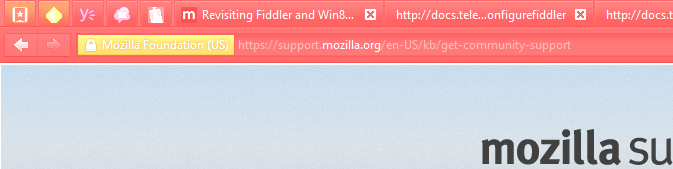
Firefox chrome in washed-out colors, hard to read

Hi, To see anything but bright washed-out colors and text, I had to change to a dark theme! (NASA Night Launch) But this is as good as it gets, bleached pink (should be black), text still hard to read.
- Web page ok, it's just the chrome (tabstip, address bar and other toolbars) that is messed up. - Only present on one of my computers (with FF32.0.1). - On this computer (laptop), the problem is present on two recently added external displays. (not the built-in, not previously added displays) - Only Firefox affected, no other programs running on my Win8.1update is affected. (other browsers show regular colors/text in tabstrips, toolbars, menus etc. - Problem gone while in Firefox Safe Mode. - Problem remains even if I disable every single add-on, and set "ask to activate" on every plugin.
Any ideas? Hope to be able to stick to Firefox in the future :)
Solução escolhida
Can you attach a screenshot?
- http://en.wikipedia.org/wiki/Screenshot
- https://support.mozilla.org/kb/how-do-i-create-screenshot-my-problem
- Use a compressed image type like PNG or JPG to save the screenshot
- Make sure that you do not exceed the maximum size of 1 MB
Were you using or did you ever use a lightweight theme (Persona)?
Try to disable hardware acceleration in Firefox.
- Tools > Options > Advanced > General > Browsing: "Use hardware acceleration when available"
You need to close and restart Firefox after toggling this setting.
- https://support.mozilla.org/kb/Troubleshooting+extensions+and+themes
- https://support.mozilla.org/kb/upgrade-graphics-drivers-use-hardware-acceleration
Todas as respostas (2)
Solução escolhida
Can you attach a screenshot?
- http://en.wikipedia.org/wiki/Screenshot
- https://support.mozilla.org/kb/how-do-i-create-screenshot-my-problem
- Use a compressed image type like PNG or JPG to save the screenshot
- Make sure that you do not exceed the maximum size of 1 MB
Were you using or did you ever use a lightweight theme (Persona)?
Try to disable hardware acceleration in Firefox.
- Tools > Options > Advanced > General > Browsing: "Use hardware acceleration when available"
You need to close and restart Firefox after toggling this setting.
Thanks, I just didn't see the "hardware acceleration" setting while jogging around the options!
Seems to be working fine now, although I needed to reboot twice before getting rid of some display (and browser failing) hiccups that came just after this re-configuration. I guess that was a coincidence. But just to be sure, this setting did not change anything outside the Firefox environment, right? Thanks again!
Also, included screenshots in case someone else run into the same problem.