


SEND button vanished after update (bug1989214)

After updating to 153.0.1esr(aarch64). the SEND button has disappeared. There's no way to send an email. (I can receive emails.) I am a Mac mini M2 Pro. OS 26.4.1
I cannot find a link to download a previous release of Thuderbird, which was working fine until this update.
Zmodyfikowany przez Wayne Mery w dniu
Wszystkie odpowiedzi (10)
- click 'new message' button from main screen
- click the alt key to display the menu bar
- click view>show and tick composition toolbar
This doen't help. 153.0.2 has the same problem: NO WAY TO SEND. No Send button. And Macs don't have an alt key. Tell me how to SEND an email please.

You may want to try a short cut key for now : control key + enter ( or cmd + enter for Mac )
https://support.mozilla.org/en-US/kb/keyboard-shortcuts-thunderbird
Does this help? I know nothing about mac. https://iboysoft.com/wiki/alt-key-on-mac.html

There's no need to invoke the menu because the menu is always visible on a Mac, at least through version 140. Not showing the menu all the time would be very un-Mac-like.
Tagtagtag, would you please say or show what happens when you start a new message and show the the composition toolbar? The composition toolbar has a "send" button it. If it doesn't, you can customize it to show the "send" button. Can you not show the composition toolbar? Does it not have a "send" button"? Have you tried to customize the composition toolbar by right clicking on it?
There are other ways to send a message. On the keyboard, press <command>+<return>, as Michel wrote. In the menu, select File > Send Now.
See attaches pictures
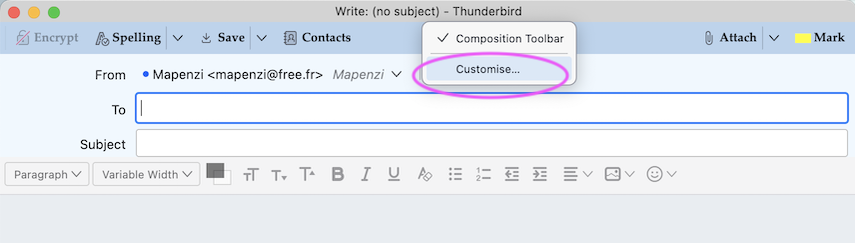
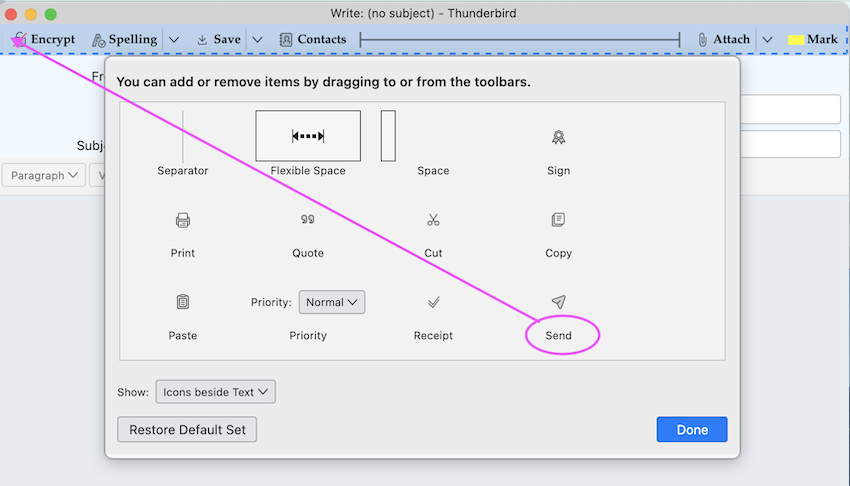
If you cannot find a "send" button to add to your composition toolbar:
- See if the problem persists in troubleshooting mode (under the "Help" menu).
- Follow this thread: https://support.mozilla.org/en-US/questions/1570231

No Send Button also on 153.0.3esr (64-bit) ... Windows 11 Only way to send emails is File/Send Now or Send Later
RonSH said
No Send Button also on 153.0.3esr (64-bit) ... Windows 11 Only way to send emails is File/Send Now or Send Later
What happens when you try the suggestions above?
Just solved it! Settings had been slightly changes during update. All good now Thanks