


Firefox insisting on passkey for Paypal

When try to sign in to Paypal, Firefox insists on setting a passkey which I do not want. How do I skip that page?
Wszystkie odpowiedzi (4)
It's most likely PayPal insisting to upgrade to a Passkey — try to find a pane or option to get rid of that on their side, if you only intend to use passwords. Like, "X" buttons, "Try Another Way" etc. — I know they make it hard, sometimes folks have to manually go back to the home page again agter closing the Passkey prompt etc. — but that's all coming from the site operator, they think they're smarter… 🤷
(There's way to disable Webauthn functionality as a whole, in case you don't intent to use that wholesale, across all sites, and don't use any Webauth credentials elsewhere, but trying to squelch PayPal would be more preferable I guess.)

kfingleton41, Firefox has recently started requesting device sign in from some users before it will allow them to access the passwords stored within the browser.
It might be worth seeing if Firefox has the setting "Require device sign in to fill and manage passwords" enabled, to check if this is what is causing the authentification prompts that you are seeing.
This article has more information. https://support.mozilla.org/en-US/kb/firefox-password-authentification-prompt

I too have this problem.
After an hour working with PayPal tech support here's what has definitely leads to FireFox: 1. PayPal > Settings > Security - there is nothing set up for passkeys. 2. Windows 11 > Settings > Accounts > Passkeys - there is no setting or PayPal.
When I did set up a passkey in PayPal, then deleted it immediately, I got a pop up window saying that it is Mozilla Firefox "demanding, requiring" that I set one up (see attached screen shot).
What is the solution to this problem?
P.S. ~ I found this short term work around this FireFox problem:
After clicking cancel when the passkey window setup box closes at log-in, I click on the "contact us" link at the bottom of the log-in page. Guess what, it by passes FireFox's unclosable passkey pop-up, and takes me directly to my PayPal home page.
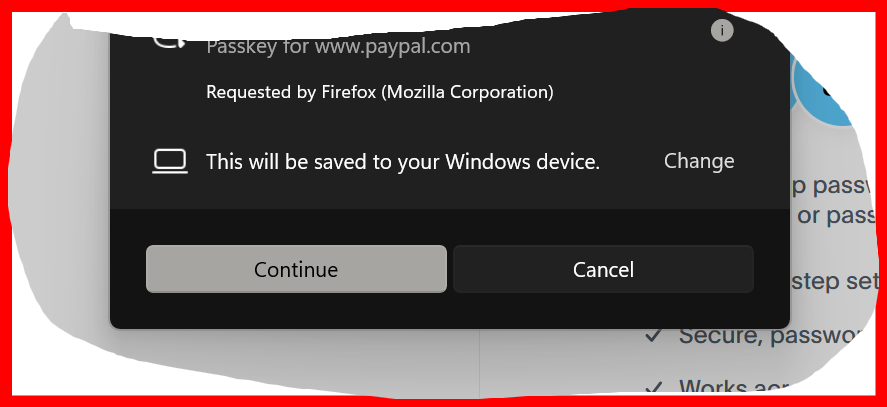
Zmodyfikowany przez lajoes w dniu
The browser can't make up credentials. The API for that is triggered by the website. The dialog also shows it doesn't store the credential, it's passed to the operating system to store it.
I don't know what's the PayPal's recommendation to wipe any traces after creating one and deleting it afterwards, but they just need to stop either insisting on one, or upgrading your account to it.
This is how the requests work: developer.mozilla.org/en-US/docs/Web/API/Web_Authentication_API
If you're unable to avoid it at the site side of things, you can shut down the whole API, see some previous threads: