


can no longer add, edit, tag, or remove bookmarks - when I click on the icon, no dropdown appears

I can't figure out which topic to use for this but I can't submit it without one.
When I click on the star icon in the address bar the star icon is filled in, and existing bookmarks do show with the filled-in star icon and they work. But I no longer get a dropdown where I can assign a folder, edit, tag, or delete an existing bookmark, and the pages I've tried to bookmark don't show up in Recently Bookmarked so they haven't been added. I don't know if it has something to do with the toolbar?
Nothing I can find online helps. The places.sqlite file in my profile is not read-only, and I refreshed Firefox (stupidly, before I took a screenshot of the pinned shortcuts on my New Tabs page) and that made no difference. The only extension I use is UBlock Origin. Changing profiles did not help. This is on my personal laptop and no organization controls my settings.
I stay up to date on Windows 11 and Firefox updates. I do use a VPN but it never interfered with bookmarking functionality before. (I see Firefox offers a free one now but I've got a couple of years left on my paid subscription).
I asked the community but got no replies. (I did "reply" to add more information which no longer applies, and I can't seem to delete the "reply".)
Thanks in advance for any help!
Wybrane rozwiązanie
doodlerzq, did you try either Troubleshoot Mode, or creating a temporary 2nd test profile just for checking if you could bookmark normally there? (note, I know that you have refreshed, but that is not the same as creating a new blank profile)
Also, can you manually create bookmarks? As in, go to the Bookmarks library, select Add Bookmark from the Organise menu, then filling in the fields?
Some other possibilities to consider.
The bookmarks system is saved in two files, places.sqlite and favicons.sqlite. I know that you have checked a few things with places.sqlite, but if you haven't already you could try the same checks with favicons.sqlite. (such as checking if it is read-only, or moving it out of the profile folder to force a recreation of it)
It might be a question of file permissions, as in for some reason there is no longer sufficient permission for Firefox to work with these two files. (note, I know that you have checked the read-only status of at least places.sqlite, but I am talking about the file ownership / control kinds of permissions)
Or it might be that anti-virus software or other 3rd-party applications are interfering. You could try running Windows in safe mode then testing.
Przeczytaj tę odpowiedź w całym kontekście 👍 1Wszystkie odpowiedzi (20)
Can you Refresh Firefox? You can get to that by typing refresh in your address bar, and a button will appear.
I've already tried that and it made no difference. But thank you for responding.
Enter about:support in the address bar and click the Verify integrity button in the Places database section. It should produce a log, paste it here for analysis.
Thank you! Here's the log.
> Task: checkIntegrity + The places.sqlite database is sane + The favicons.sqlite database is sane > Task: checkCoherence + The database is coherent > Task: expire + Database cleaned up > Task: vacuum + Initial database size is 20480KiB + The database has been vacuumed + Final database size is 20480KiB > Task: stats + Places.sqlite size is 20480KiB + Favicons.sqlite size is 20928KiB + pragma_user_version is 86 + pragma_page_size is 32768 + pragma_cache_size is -2048 + pragma_journal_mode is wal + pragma_synchronous is 1 + History can store a maximum of 86995 unique pages + Table moz_origins has 2591 records + Table moz_places has 20030 records + Table moz_historyvisits has 20424 records + Table moz_inputhistory has 37 records + Table moz_bookmarks has 16438 records + Table moz_bookmarks_deleted has 0 records + Table moz_keywords has 0 records + Table sqlite_sequence has 1 records + Table moz_anno_attributes has 3 records + Table moz_annos has 30 records + Table moz_items_annos has 0 records + Table moz_meta has 10 records + Table moz_places_metadata has 13731 records + Table moz_places_metadata_search_queries has 0 records + Table sqlite_stat1 has 27 records + Table moz_previews_tombstones has 0 records + Table moz_places_extra has 0 records + Table moz_historyvisits_extra has 0 records + Table moz_newtab_story_click has 0 records + Table moz_newtab_story_impression has 80 records + Table moz_newtab_shortcuts_interaction has 2022 records + Pages sequentiality: 41.2 + sqlite_schema: 32KiB (0.2%), 29.8% eff. + moz_inputhistory: 32KiB (0.2%), 3.4% eff. + sqlite_autoindex_moz_inputhistory_1: 32KiB (0.2%), 2.5% eff. + moz_bookmarks_deleted: 32KiB (0.2%), 0% eff. + sqlite_autoindex_moz_bookmarks_deleted_1: 32KiB (0.2%), 0% eff. + moz_keywords: 32KiB (0.2%), 0% eff. + sqlite_autoindex_moz_keywords_1: 32KiB (0.2%), 0% eff. + sqlite_sequence: 32KiB (0.2%), 0.1% eff. + moz_anno_attributes: 32KiB (0.2%), 0.3% eff. + sqlite_autoindex_moz_anno_attributes_1: 32KiB (0.2%), 0.3% eff. + moz_annos: 32KiB (0.2%), 8.5% eff. + moz_items_annos: 32KiB (0.2%), 0% eff. + moz_meta: 32KiB (0.2%), 1.7% eff. + moz_places_metadata_search_queries: 32KiB (0.2%), 0% eff. + sqlite_autoindex_moz_places_metadata_search_queries_1: 32KiB (0.2%), 0% eff. + sqlite_stat1: 32KiB (0.2%), 5% eff. + moz_previews_tombstones: 32KiB (0.2%), 0% eff. + moz_places_extra: 32KiB (0.2%), 0% eff. + moz_historyvisits_extra: 32KiB (0.2%), 0% eff. + moz_newtab_story_click: 32KiB (0.2%), 0% eff. + moz_newtab_story_impression: 32KiB (0.2%), 6.3% eff. + moz_keywords_placepostdata_uniqueindex: 32KiB (0.2%), 0% eff. + moz_annos_placeattributeindex: 32KiB (0.2%), 1.2% eff. + moz_items_annos_itemattributeindex: 32KiB (0.2%), 0% eff. + moz_newtab_story_click_newtab_click_timestampindex: 32KiB (0.2%), 0% eff. + moz_newtab_story_impression_newtab_impression_timestampindex: 32KiB (0.2%), 2.7% eff. + moz_newtab_shortcuts_interaction_timestampindex: 32KiB (0.2%), 73.7% eff. + moz_newtab_shortcuts_interaction_placeidindex: 32KiB (0.2%), 65.5% eff. + moz_newtab_shortcuts_interaction: 96KiB (0.6%), 40.2% eff. + sqlite_autoindex_moz_origins_1: 128KiB (0.8%), 69% eff. + moz_origins: 160KiB (1%), 62.4% eff. + moz_places_visitcount: 224KiB (1.4%), 76.7% eff. + moz_historyvisits_fromindex: 224KiB (1.4%), 82.4% eff. + moz_bookmarks_itemindex: 224KiB (1.4%), 79.5% eff. + moz_places_altfrecencyindex: 224KiB (1.4%), 76.2% eff. + moz_places_frecencyindex: 256KiB (1.6%), 79.8% eff. + moz_places_originidindex: 256KiB (1.6%), 78.3% eff. + moz_bookmarks_parentindex: 256KiB (1.6%), 76.7% eff. + moz_places_metadata_placecreated_uniqueindex: 288KiB (1.7%), 83.6% eff. + moz_places_url_hashindex: 320KiB (1.9%), 90% eff. + moz_places_lastvisitdateindex: 320KiB (1.9%), 84% eff. + moz_bookmarks_dateaddedindex: 320KiB (1.9%), 80.3% eff. + moz_historyvisits_dateindex: 352KiB (2.1%), 90.7% eff. + moz_bookmarks_itemlastmodifiedindex: 352KiB (2.1%), 86.7% eff. + moz_bookmarks_guid_uniqueindex: 384KiB (2.3%), 83.6% eff. + moz_places_guid_uniqueindex: 448KiB (2.7%), 90.5% eff. + moz_historyvisits_placedateindex: 448KiB (2.7%), 88.8% eff. + moz_places_metadata: 544KiB (3.3%), 93.8% eff. + moz_places_hostindex: 544KiB (3.3%), 92.5% eff. + moz_historyvisits: 576KiB (3.5%), 92.8% eff. + moz_bookmarks: 1760KiB (10.7%), 97.3% eff. + moz_places: 6912KiB (41.9%), 98.9% eff. > Task: _refreshUI
Statistics Last Idle Maintenance Date 5/18/2026, 2:12 AM Last Vacuum Date 5/18/2026, 2:12 AM

doodlerzq, I wonder if it is a case of the option 'Show editor when saving' having become disabled?
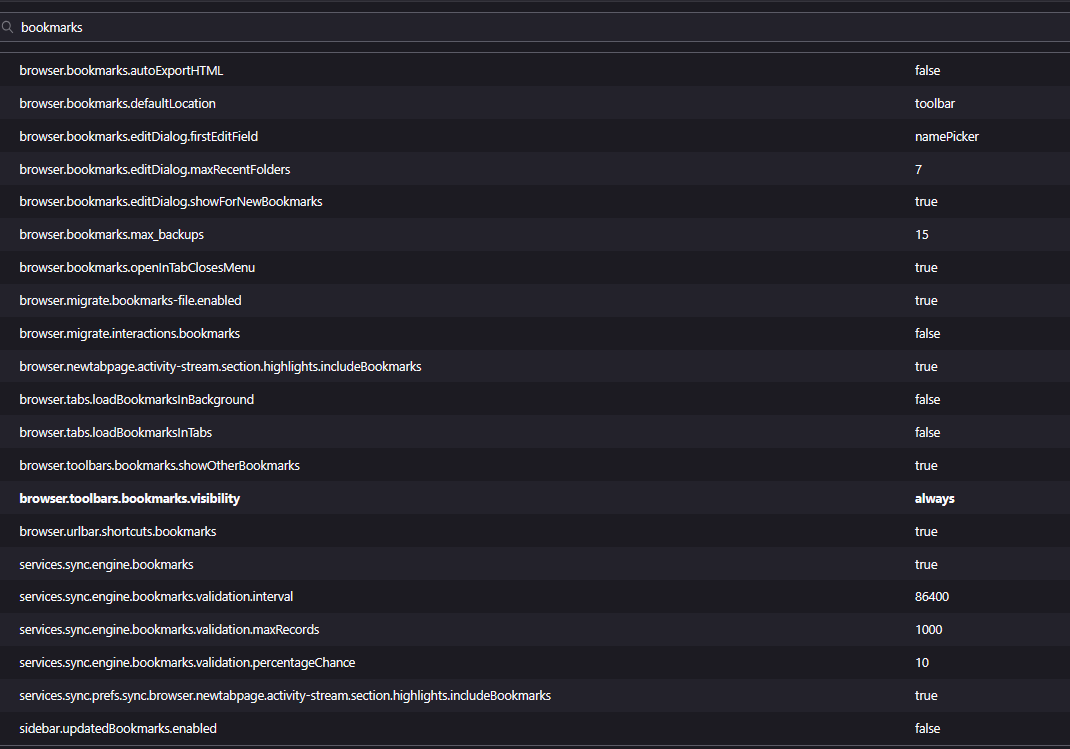
If you open about:config and search for browser.bookmarks.editDialog.showForNewBookmarks, is the value set to true?
Unfortunately it is but that sounds like a step in the right direction. Do you see other values here that might affect it? Maybe one of the browser.tabs or browser.toolbars options?
doodlerzq, have you tested in Troubleshoot Mode (found in the Help menu)?
Have you tested in a newly created profile that has not had any customisations added to it?
Also, you say that new bookmarks aren't beeing added as they do not appear under 'recently bookmarked', but have you tried finding them directly? By, say, searching for them in either the Bookmarks sidebar or Library? (just in case this is an issue with the recently bookmarked section)
Another possibility, if other tests fail, is to fully close Firefox, move the places.sqlite file out of the profile folder, then restart Firefox and test. This will cause Firefox to recreate places.sqlite using the most recent backup of the bookmarks. Although you will lose all history. You can always go back by restoring the original places.sqlite.
Sorry I personally can't help with the screenshots as I cannot easily see them at my end. This is not a problem at your end. Hopefully someone else can help there, or more generally if the above doesn't work.
Thanks again! I just tried creating a new bookmark and searching for it in in all bookmarks and it wasn't there. I have tried removing places.sqlite and restarting Firefox and it didn't help.
I tried pasting the screenshot here in hopes that it might be easier to read than the attachment but I couldn't do it.
Thanks very much for your time!!
doodlerzq, can you add bookmarks via other methods?
- pressing ctrl+D
- right-clicking the tab header then selecting the bookmark item from the context menu
- right-clicking a site in the history sidebar or library then selecting the bookmark item from the context menu
Also, if you click the filled in bookmark star icon when visiting a pre-bookmarked site, do you get an edit dialogue box then?
Zmodyfikowany przez TechHorse w dniu
- ctrl+D fills in the star but does not create a bookmark
- right-clicking the tab header does drop down the menu(!!) but the Save button is grayed out; I can only Cancel
- right-clicking a site from history does the same - drops down a menu, lets me assign a folder and tag, but the Save button is grayed out and I can only Cancel
- clicking the bookmark icon on a pre-bookmarked site does not drop down the edit dialogue box
Definitely getting closer to a solution - thank you!!
- ctrl+D fills in the star but does not create a bookmark
- right-clicking the tab header does drop down the menu(!!) but the Save button is grayed out; I can only Cancel
- right-clicking a site from history does the same - drops down a menu, lets me assign a folder and tag, but the Save button is grayed out and I can only Cancel
- clicking the bookmark icon on a pre-bookmarked site does not drop down the edit dialogue box
Definitely getting closer to a solution - thank you!!
- ctrl+D fills in the star but does not create a bookmark
- right-clicking the tab header does drop down the menu(!!) but the Save button is grayed out; I can only Cancel
- right-clicking a site from history does the same - drops down a menu, lets me assign a folder and tag, but the Save button is grayed out and I can only Cancel
- clicking the bookmark icon on a pre-bookmarked site does not drop down the edit dialogue box
Definitely getting closer to a solution - thank you!!
Sorry about the multiple replies - I thought the Post Reply button wasn't working.
Wybrane rozwiązanie
doodlerzq, did you try either Troubleshoot Mode, or creating a temporary 2nd test profile just for checking if you could bookmark normally there? (note, I know that you have refreshed, but that is not the same as creating a new blank profile)
Also, can you manually create bookmarks? As in, go to the Bookmarks library, select Add Bookmark from the Organise menu, then filling in the fields?
Some other possibilities to consider.
The bookmarks system is saved in two files, places.sqlite and favicons.sqlite. I know that you have checked a few things with places.sqlite, but if you haven't already you could try the same checks with favicons.sqlite. (such as checking if it is read-only, or moving it out of the profile folder to force a recreation of it)
It might be a question of file permissions, as in for some reason there is no longer sufficient permission for Firefox to work with these two files. (note, I know that you have checked the read-only status of at least places.sqlite, but I am talking about the file ownership / control kinds of permissions)
Or it might be that anti-virus software or other 3rd-party applications are interfering. You could try running Windows in safe mode then testing.
TechHorse, thank you, thank you, thank you!!! Creating a new favicons.sqlite worked!
For the record, I had tried creating a new places.sqlite, and I had full permissions on both places.sqlite and favicons.sqlite.
I'm so relieved. I'm a bookmark hoarder and I use tags a lot.
Thank you very, very much!!!
I just realized I updated Firefox when I did that last restart. That may or may not have had something to do with it, but I think it was the favicons.sqlite file that solved the problem.
doodlerzq, so it might have been favicons.sqlite that was causing the problem. If so then that would probably explain why a refresh did not help. A refresh basically creates a new profile then copies some files from the original into the new folder. Which will occasionally mean that a faulty file could get copied back.
Well anyway, glad things are back on track now.
TechHorse, is it OK if I mention you in my feedback on the bookmark fix page?