


in inbox some mails suddenly empty and cannot be deleted, other messages not affected
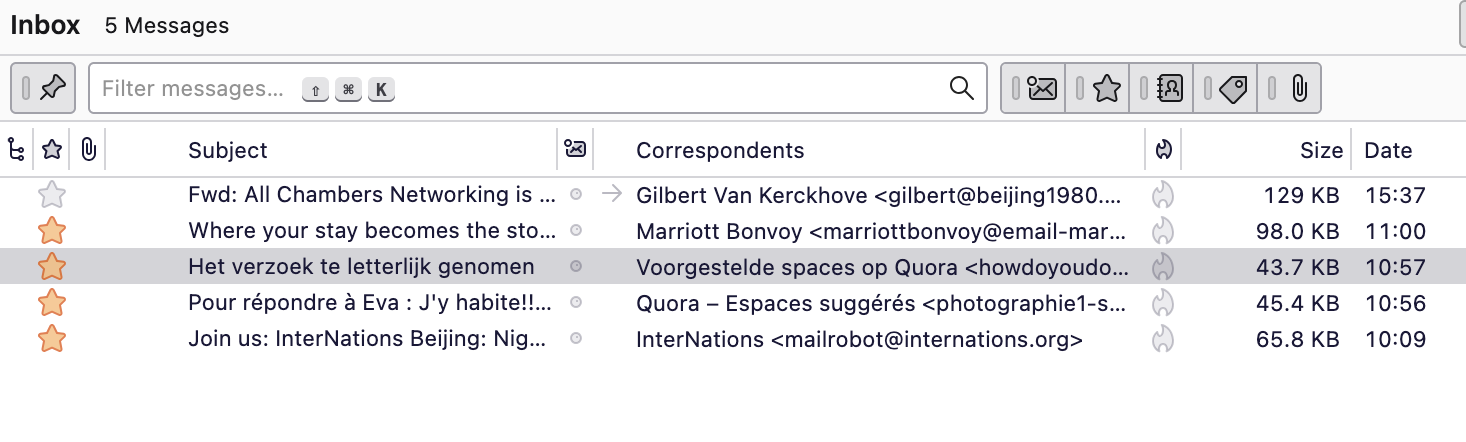
in inbox suddenly some mails became empty and cannot be deleted nor moved nor archived, other messages not affected. It happened earlier and was asked to delete the inbox folder, that worked. But again same problem happening on the same email account, other accounts no problem. See screenshot, the bad ones have red star. Clicking on bad ones: empty screen. MacBook Pro latest OS and software
Wybrane rozwiązanie
It sounds like Thunderbird is encountering corruption or sync issues with that particular mailbox. Here’s what you can try:
Repair the folder
Right-click the problematic inbox → Properties → Repair Folder. This rebuilds the index and often fixes “empty mail” issues.
Compact folders
From the menu: File → Compact Folders. This removes deleted or orphaned messages that might be causing the problem.
Check for server-side issues
Log in to your email provider via webmail. Make sure those messages aren’t actually missing or flagged differently. Sometimes Thunderbird’s cache can get out of sync with the server.
Create a new folder and move mails
If the repair doesn’t work, create a temporary folder, try moving messages there, and then delete the old inbox folder.
Check add-ons or filters
Sometimes extensions or filters interfere with display or deletion of specific emails. Try disabling add-ons temporarily.
Backup & recreate account
If nothing works, remove and re-add the account in Thunderbird (after backing up your emails). This refreshes the local cache and index.
Since it happens only on this account, it’s likely a corrupted index or server sync issue rather than a Thunderbird-wide bug.
Przeczytaj tę odpowiedź w całym kontekście 👍 0Wszystkie odpowiedzi (3)
Solution: Unable to delete mails in Inbox In my case delete inbox and inbox.msf. Troubleshooting Steps: Check for Corrupted Inbox Folder: ◦ Open Thunderbird and navigate to Help > Troubleshooting Information. ◦ Click "Open Folder" to open your profile folder. ◦ Close Thunderbird. ◦ Locate and delete the “Inbox and “Inbox.msf" files within the Mail ◦ Restart Thunderbird. If you have an IMAP account, a new Inbox folder will be created automatically.
The problem is: what causes it?

Wybrane rozwiązanie
It sounds like Thunderbird is encountering corruption or sync issues with that particular mailbox. Here’s what you can try:
Repair the folder
Right-click the problematic inbox → Properties → Repair Folder. This rebuilds the index and often fixes “empty mail” issues.
Compact folders
From the menu: File → Compact Folders. This removes deleted or orphaned messages that might be causing the problem.
Check for server-side issues
Log in to your email provider via webmail. Make sure those messages aren’t actually missing or flagged differently. Sometimes Thunderbird’s cache can get out of sync with the server.
Create a new folder and move mails
If the repair doesn’t work, create a temporary folder, try moving messages there, and then delete the old inbox folder.
Check add-ons or filters
Sometimes extensions or filters interfere with display or deletion of specific emails. Try disabling add-ons temporarily.
Backup & recreate account
If nothing works, remove and re-add the account in Thunderbird (after backing up your emails). This refreshes the local cache and index.
Since it happens only on this account, it’s likely a corrupted index or server sync issue rather than a Thunderbird-wide bug.
Many thanks to ayla74108 for the detailed answer. Yes, compare it with the solution I wrote earlier. I did practically everything you wrote except for: Repair the folder - Right-click the problematic inbox → Properties → Repair Folder. This rebuilds the index and often fixes “empty mail” issues So, I did learn something new. Before I deleted the inbox I archived all emails - no need to creat temporary folder.