


Windows 10 reached EOS (end of support) on October 14, 2025. If you are on Windows 10, see this article.

Przeszukaj pomoc

Unikaj oszustw związanych z pomocą.Nigdy nie będziemy prosić Cię o dzwonienie na numer telefonu, wysyłanie SMS-ów ani o udostępnianie danych osobowych. Zgłoś podejrzaną aktywność, korzystając z opcji „Zgłoś nadużycie”.

Więcej informacji
Wątek został zarchiwizowany. Jeśli potrzebujesz pomocy, zadaj nowe pytanie.
Zarchiwizowany

High GPU Usage (100%) While Watching YouTube Videos in Firefox

ABDERRAHIM DJ odpowiedziano
ABDERRAHIM DJ

Hello Firefox Support,

I’m encountering a strange issue with Firefox. While playing YouTube videos at very low quality (144p) just to listen to music, my GPU usage spikes to 100%. This happens even when the video is not fullscreen and there’s minimal visual content.

System Info:

   Firefox Version: 140.0.2 (64-bit)
   Operating System: Windows 11 
   CPU: AMD Ryzen 7 8700F (no integrated GPU)
   GPU: AMD Radeon RX 7900 GRE
   GPU Driver Version: AMD Adrenalin 25.6.1 

The issue goes away when I disable hardware acceleration in Firefox settings, but I’d prefer to leave it enabled for better performance elsewhere.

Is this a known issue with AMD GPUs or is there something else I can try to reduce GPU usage during playback?

Thank you for your help.
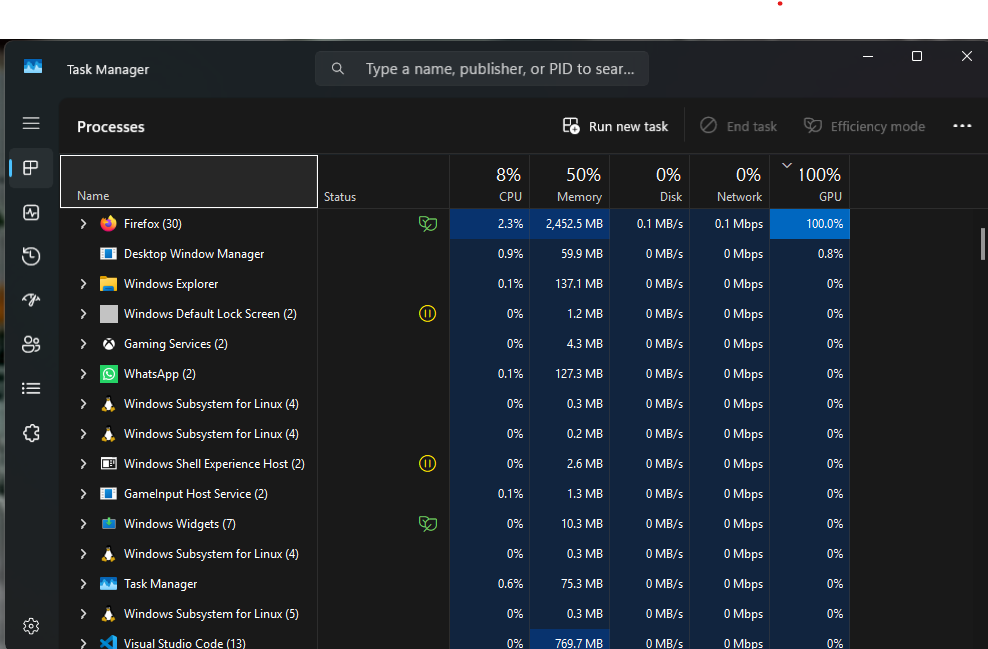
Hello Firefox Support, I’m encountering a strange issue with Firefox. While playing YouTube videos at very low quality (144p) just to listen to music, my GPU usage spikes to 100%. This happens even when the video is not fullscreen and there’s minimal visual content. System Info: Firefox Version: 140.0.2 (64-bit) Operating System: Windows 11 CPU: AMD Ryzen 7 8700F (no integrated GPU) GPU: AMD Radeon RX 7900 GRE GPU Driver Version: AMD Adrenalin 25.6.1 The issue goes away when I disable hardware acceleration in Firefox settings, but I’d prefer to leave it enabled for better performance elsewhere. Is this a known issue with AMD GPUs or is there something else I can try to reduce GPU usage during playback? Thank you for your help.
Załączone zrzuty ekranu

Wszystkie odpowiedzi (2)

Try to enter about:config in the address bar and try to set these preferences:

  • gfx.webrender.overlay-vp-super-resolution = false
  • gfx.webrender.overlay-vp-auto-hdr = false

hi thank you for replying, i solve it by disable hardware acceleration, and i want to know why this keep happening in all the apps that has hardware acceleration active like figma and postman