

Wątek został zarchiwizowany.
Jeśli potrzebujesz pomocy, zadaj nowe pytanie.

Zarchiwizowany
New tab with icons

I have Firefox installed on my Windows 11 laptop. When I click on a new tab, I want that new tab to show 4 rows of icons of sites I have visited most frequently like my bank, Amazon, etc. I do not know how to set a new tab to show the 4 rows of icons. These icons show up in Firefox on my Windows 10 desktop computer but not on Windows 11 laptop.
I have Firefox installed on my Windows 11 laptop. When I click on a new tab, I want that new tab to show 4 rows of icons of sites I have visited most frequently like my bank, Amazon, etc. I do not know how to set a new tab to show the 4 rows of icons. These icons show up in Firefox on my Windows 10 desktop computer but not on Windows 11 laptop.
Wszystkie odpowiedzi (2)

What do you have set here? see screenshot
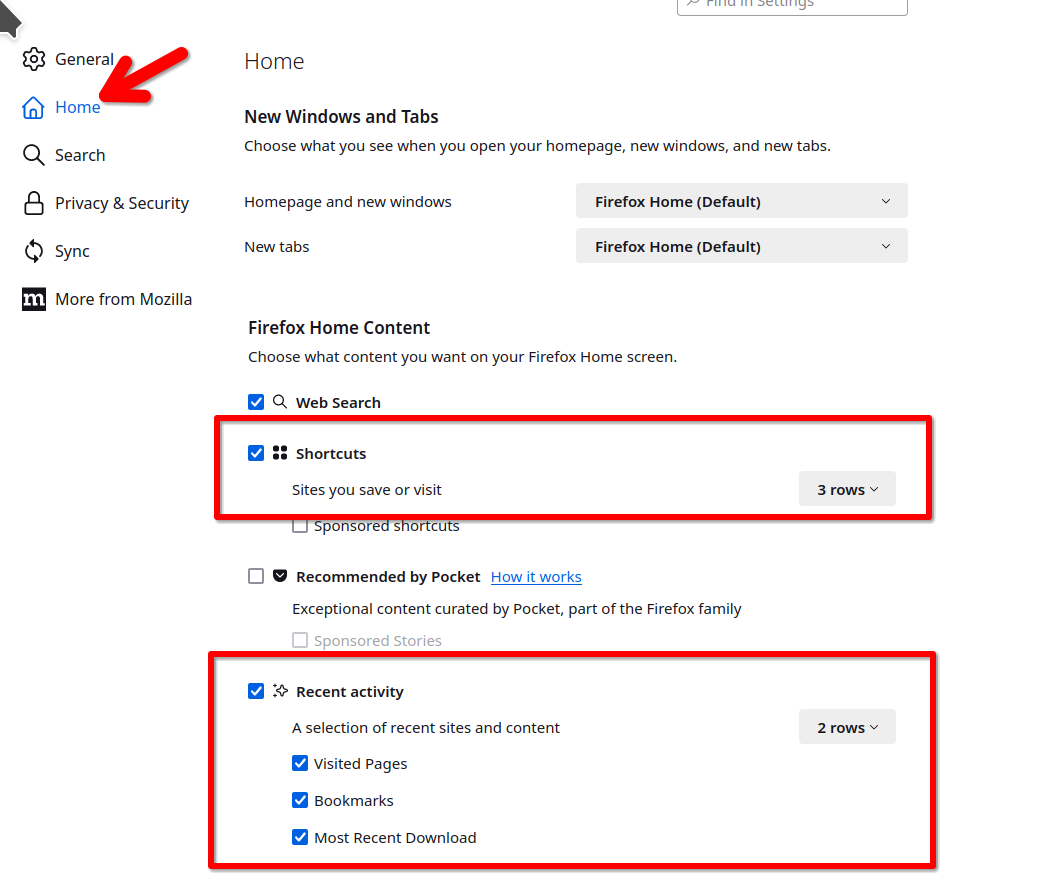
Zmodyfikowany przez jonzn4SUSE w dniu
You need to set the new tab page to the Firefox Home page in "Settings -> Home".
See also: