


how do i import bookmarks from safari to firefox (70.0.1 (64-Bit)) (Standard procedure does not work, bookmarks are sucessfully imported by do not show anywhere
how do i import bookmarks from safari to firefox (70.0.1 (64-Bit)) (Standard procedure does not work, bookmarks are sucessfully imported by do not show anywhere...) also, there is no "star icon in the left upper corner that will display the option to choose my imported bookmarks. If you want more people stick to firefox you should seriously work on an easy solution for newbies to import their old bookmarks. I`ll give it 24 hours before I switch to google chrome....
Wszystkie odpowiedzi (7)

Hi jan, Your Bookmarks should be in a folder - From Safari. See: Import Bookmarks and personal data from another browser https://support.mozilla.org/en-US/kb/import-bookmarks-data-another-browser
and
Bookmarks in Firefox https://support.mozilla.org/en-US/kb/bookmarks-firefox
The "Star Icon" can be added to your toolbar from the Customize Palette: See: Customize Firefox controls, buttons and toolbars https://support.mozilla.org/en-US/kb/customize-firefox-controls-buttons-and-toolbars
Thanks: èart one of the answer: that is not the problem, I can export my bookmarks from safari where I want (what I did)
Part 2: answer does not deal about my problem (importing bookmarks)
Part 3: thanks, shall try this.
Did you try a search in the Bookmarks Manager (Library) for those imported bookmarks ?
Same problem here.
Trying to bring bookmarks from Safari to Firefox, I've carefully followed the instructions provided by Robertj with no success.
Using "Import data from another browser" I get "From Safari" folders but they're empty. Using "Import bookmarks from HTML" and selecting the bookmark file I exported from Safari, I get an "Export Complete" message but nothing shows up in Firefox. Not even empty folders.
I've tried repeatedly. Quit browsers, rebooted, opened browsers, nothing works.
Help?
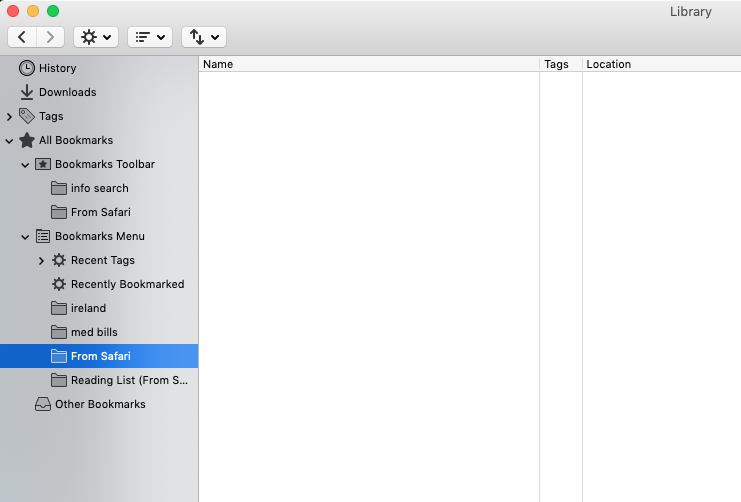
Zmodyfikowany przez jchinggis w dniu
jchinggis said
Using "Import data from another browser" I get "From Safari" folders but they're empty. Using "Import bookmarks from HTML" and selecting the bookmark file I exported from Safari, I get an "Export Complete" message but nothing shows up in Firefox. Not even empty folders.
Apparently, you exported your bookmarks from Safari in an html file. Can you open the file in Firefox and see your bookmarks there?
There's also this article:
Importing Safari data into Firefox
https://support.mozilla.org/en-US/kb/importing-safari-data-firefox#firefox:mac:fx73
which is specific to Mac users.
Thanks for speedy reply. I can open the html file in Firefox.
But import into the bookmarks library fails every time. I'm using the instructions in the link you provided.
Stumped!
JS
jchinggis said
Stumped!
Me, too. Hopefully it's something simple that's been overlooked.
Continue at: https://support.mozilla.org/en-US/questions/1281071
Zmodyfikowany przez user104147805413306348376805769878442569366 w dniu