


60fps video playback is choppy on OSX on my hardware in Firefox

I've seen a post about this in regards to Windows, but not on OSX, so I created this post.
Playback is not smooth at all on 60fps playback. I've tried in safe mode, with no extensions, I've tried a number of different things, and none of them help. I can play 60fps videos fine in Chrome and Safari, but not on Firefox.
Point of note: I'm running non-apple hardware, it's a tower I built. i5 quad core processor, 8gb ram, geforce 1gb ram video card, it has done me well for the most part.
Wszystkie odpowiedzi (10)
Try disabling graphics hardware acceleration. Since this feature was added to Firefox, it has gradually improved, but there still are a few glitches.
You will need to restart Firefox for this to take effect so save all work first (e.g., mail you are composing, online documents you're editing, etc.).
Then perform these steps:
- Click the menu button
 and select Options on Windows or Preferences on Mac or Linux.
- Select the Advanced panel and then the General tab.
- Uncheck Use hardware acceleration when available.
- Restart Firefox and see if the problems persist.
Did this fix your problems? Please report back to us!
If the problem is resolved, you should check for updates for your graphics driver by following the steps mentioned in these Knowledge base articles:
Thank you.
That made it *much* worse. And there's no update available for my graphics card, I'm already on the current version.
Try Firefox Safe Mode to see if the problem goes away. Firefox Safe Mode is a troubleshooting mode that temporarily turns off hardware acceleration, resets some settings, and disables add-ons (extensions and themes).
If Firefox is open, you can restart in Firefox Safe Mode from the Help menu:
- Click the menu button , click Help
 and select Restart with Add-ons Disabled.
If Firefox is not running, you can start Firefox in Safe Mode as follows:
- On Windows: Hold the Shift key when you open the Firefox desktop or Start menu shortcut.
- On Mac: Hold the option key while starting Firefox.
- On Linux: Quit Firefox, go to your Terminal and run firefox -safe-mode
(you may need to specify the Firefox installation path e.g. /usr/lib/firefox)
When the Firefox Safe Mode window appears, select "Start in Safe Mode".
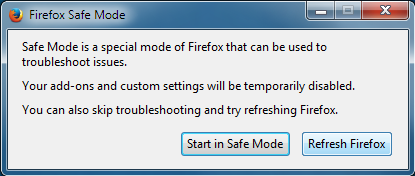
If the issue is not present in Firefox Safe Mode, your problem is probably caused by an extension, theme, or hardware acceleration. Please follow the steps in the Troubleshoot extensions, themes and hardware acceleration issues to solve common Firefox problems article to find the cause.
To exit Firefox Safe Mode, just close Firefox and wait a few seconds before opening Firefox for normal use again.
When you figure out what's causing your issues, please let us know. It might help others with the same problem.
Well, I see you're going through a standard list of things instead of actually reading what I originally posted. Have you tried watching 60fps (not 30fps video) video in Firefox on the Mac or on OSX yourself just so you know whether this is actually working, or are you really just giving canned answers? Others have reported this same issue on Windows, and these canned answers didn't help them either.
By the way: https://bugzilla.mozilla.org/buglist.cgi?quicksearch=60fps
Since this works fine on other browsers for myself and many others, it would seem to me that it would be important to fix this on Firefox, not just telling people to do half a dozen things to *maybe* get it working just a little better. Workarounds are not the answer--getting it working right in Firefox to begin with is the answer.
60fps is going to be in demand more and more as time goes on.
For now I'll just use Chrome to play videos.
Zmodyfikowany przez Kizzume w dniu
I do not have a Mac, but I am able to play a 60fps video on my Windows 7 and my Windows 10 computers without any major playback issues. I did have a bit of choppiness at some points, but that can be expected, as I am not running high performance hardware.
So here is my knowledge on the issue.
When you download something from the internet, the files are broken up into smaller chunks of data, called packets. When transferring these packets over the internet, there are two major methods to do so. There is the Transmission Control Protocol (TCP) and User Datagram Protocol (UDP).
TCP is slow, but it ensures that your computer receives and can open the packet before sending the next packet. This is good for downloading low priority files, like Word documents and still images.
UDP is faster. It will just send packets as fast as it is able to do so and doesn't ensure that your computer received the packet before sending the next. Therefore, during the time that it takes your computer to receive, process and load the packet, all other received packets are just discarded. Because it is faster, this is the method that is used for videos and audio. This is why, if your equipment is not fast enough, outdated or even faulty, you could experience choppy or distorted videos.
That being said, since Google Chrome can play the video without visible issues, your video playing issues are most likely not caused by faulty or slow hardware. This issue could be because you are missing a plugin for the HTML5 player in Firefox to work properly.
Can you please open this YouTube page and tell me which boxes are checked and which are unchecked?
Also, could you please try the following:
- Go to
about:config - Click the understand button
- Locate
media.hardware-video-decoding.enabledboolean - Change the value to
false
Note: You may need to restart Firefox for the changes to take effect.
On Firefox, all the boxes are checked except for "MSE & WebM VP9".
On Safari, "MSE & WebM VP9" and "WebM VP8" are unchecked.
On Chrome, all the boxes are checked.
I'll come back to this post after I restart firefox after changing that preference and trying to load this video (since it's a good test for 60fps): https://www.youtube.com/watch?v=aM70RmTd2pQ
Ok, it's still choppy.
When I search around I see that this was made an issue 2 years ago, and everything I'm reading, Firefox still doesn't support that.... but that doesn't explain why Safari doesn't have *any* choppiness in the playback, and it supports even less of those things....
Weird.
My browser did not have a checkmark next to MSE & WebM VP9 either, but if you would like to enable that support, you can do so by changing the media.mediasource.webm.enabled boolean to true in the about:config.
Also, can you please ensure that you have the OpenH264 Video Codec provided by Cisco Systems plugin installed and enabled in your plugins?
Does the video appear choppy in all resolutions or just anything over 1080p?
I do have the Cisco plugin installed and enabled.
I also enabled that media.mediasource.webm.enabled boolean and it remained the same. It will occasionally play smooth, like for 4 seconds or so, then it goes to tossing back and forth between 30fps and 60fps, then smooth for a few seconds, then back and forth between 30fps and 60fps again.
I don't play *anything* above 1080p because my monitor doesn't support it anyway. I'm just having problems playing 60fps stuff, which must be at least 720p when it comes to YouTube, and must be labeled 720p60 or 1080p60 in the YouTube player preferences. All 30fps (and below) videos play fine, no problems at all, I've never had any choppiness.