


Disable hidden extension in Firefox
Hi there.
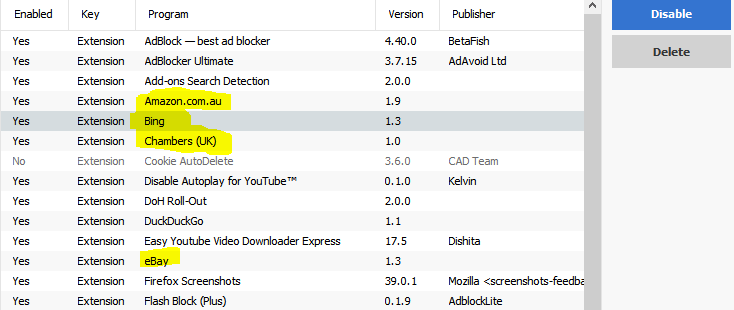
I am looking to disable the following hidden extensions on Firefox 95 64bit.
Amazon.com.au Bing Chambers(UK) eBay
When i go to the addons / extensions setting in firefox these are not showing up, yet when i use CCleaner they are there. When i disable them using CCleaner they enable themselves immediately.
Any assistance with this would be great,
Many thanks,
Chucky Orr Laww
Valgt løsning
It's possible these are search engines. Type about:preferences#search<enter> in the address bar. You can select any search engine to be your default from here.
You can also remove any engine from here.
Chucky Orr Laww said
I am looking to disable the following hidden extensions . . . .
Start Firefox using Troubleshoot(Safe) Mode {web link}
A small dialog should appear. Click Start In Troubleshoot(Safe) Mode (not Refresh).
Then check the Add-ons Manager.
Les dette svaret i sammenhengen 👍 1All Replies (6)

Valgt løsning
It's possible these are search engines. Type about:preferences#search<enter> in the address bar. You can select any search engine to be your default from here.
You can also remove any engine from here.
Chucky Orr Laww said
I am looking to disable the following hidden extensions . . . .
Start Firefox using Troubleshoot(Safe) Mode {web link}
A small dialog should appear. Click Start In Troubleshoot(Safe) Mode (not Refresh).
Then check the Add-ons Manager.
Hi Fred.
You're a superstar! Many thanks.
Glad to help. Safe Surfing.
Note that you also see these built-in search engines listed on the "Help -> More Troubleshooting Information" (about:support) page.

cor-el said
Note that you also see these built-in search engines listed on the "Help -> More Troubleshooting Information" (about:support) page.
So how do you remove them? You call them search engines, Firefox calls them extensions on the above page. Says they are enabled, yet they do not show up in the About:add-ons page, and any search engines with the same names have been removed.
So, what are they, and why can they not be COMPLETELY disabled or removed?
Firefox comes with an extensive list of built-in search engine extensions and for each locale some are enabled and can't be disabled by a user.
- location bar => resource://search-extensions/
You can only use the Remove button on the "Settings -> Search" page to hide a search engine.