


Join us to show up for other Firefox users 🦊. Earn fun badges and Mozilla swag vouchers! Find out more: https://mzl.la/askafox150

Windows 10 bereikte EO (einde ondersteuning) op 14 oktober 2025. Als je Windows 10 gebruikt, lees dan dit artikel.

Windows 10 reached EOS (end of support) on October 14, 2025. If you are on Windows 10, see this article.

Zoeken in Support

Vermijd ondersteuningsscams. We zullen u nooit vragen een telefoonnummer te bellen, er een sms naar te sturen of persoonlijke gegevens te delen. Meld verdachte activiteit met de optie ‘Misbruik melden’.

Meer info

Deze conversatie is gearchiveerd. Stel een nieuwe vraag als u hulp nodig hebt.

Computer slows down extremely for no reason, Flash videos are only played with crackling sound.

  • 3 antwoorden
  • 8 hebben dit probleem
  • 77 weergaven
  • Laatste antwoord van Sirwillshire
  • Gearchiveerd

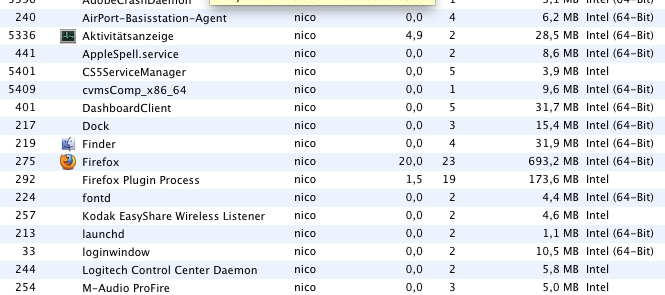
When I use a different browser and/or shutdown Firefox the problem is gone. It´s definitely something about firefox and flash videos. It slows down the whole computer and memory usage can go up to 800mb or so.

I´m using an i5 macbook pro with OSX 10.6.7.

When I use a different browser and/or shutdown Firefox the problem is gone. It´s definitely something about firefox and flash videos. It slows down the whole computer and memory usage can go up to 800mb or so. I´m using an i5 macbook pro with OSX 10.6.7.

Alle antwoorden (3)

A screenshot of my memory usage when having ten tabs open. with two sites that have an embedded flash video on it.
I'm not a Mac person but for a Win user I would suggest trying with Hardware Acceleration disabled. Options>Advanced>General>Browsing>uncheck "Use Hardware Acceleration . . ."

If this improves things you should try to update your graphics card.

Will do. I think other drivers are updated automatically. I mean - it works with Safari - but I prefer Firefox. I just don´t want to switch.