


Datum/tijd
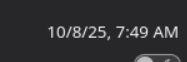
Thunderbird gracefully ignores my computers date/time format settings. I can figure out the time but is this 10. August or 8. Oktober?
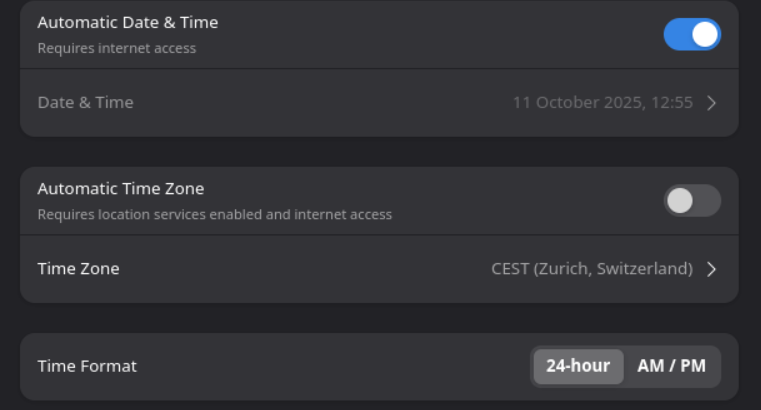
For completness I've added the settings in Fedora Gnome-Desktop
Gekozen oplossing
This is correct: https://support.mozilla.org/en-US/kb/customize-date-time-formats-thunderbird
There is a wanted to change the date format I did as suggested and changed the OS language. This also did change the menus in Thunderbird. Finally I was able to set the date settings in Instellingen > Algemeen > scoll down > click Configuration-editor and add intl.date_time.pattern_override.date_short as string and specify the proper date format
Dit antwoord in context lezen 👍 0Alle antwoorden (3)
Btw I look at this: https://support.mozilla.org/en-US/kb/customize-date-time-formats-thunderbird#w_choose-thunderbird-date-and-time-formats-defined-by-operating-system-or-application-locale
But in Thunderbird there is no Preferences in the hamburger menu
do you use the English version of Thunderbird or the dutch? there is normally a preference menu item in the hamburgermenu. In the latest versions is the menu Language & Appearance not available anymore but i believe that changing the setting in the about:config still works
Gekozen oplossing
This is correct: https://support.mozilla.org/en-US/kb/customize-date-time-formats-thunderbird
There is a wanted to change the date format I did as suggested and changed the OS language. This also did change the menus in Thunderbird. Finally I was able to set the date settings in Instellingen > Algemeen > scoll down > click Configuration-editor and add intl.date_time.pattern_override.date_short as string and specify the proper date format