


Pre/code tags sometimes show incorrectly

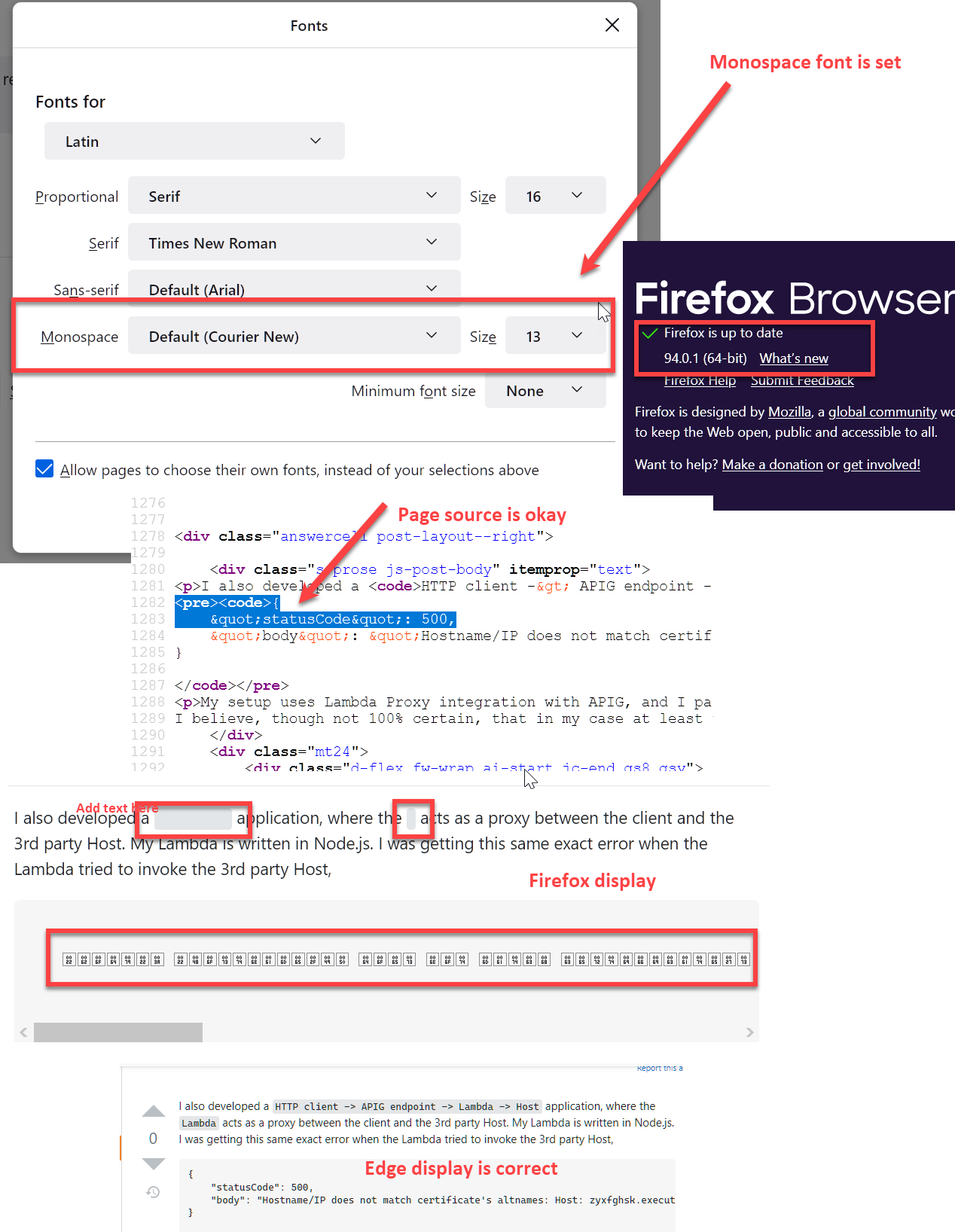
Viewing code snippets on Slack is broken. I can view code on Microsoft.com fine, and Slack in Edge displays correctly. So, I don't know if it's a Slack or Firefox issue or some combination.
Found a post about checking the monospace font, but that seems fine.
Firefox 94.0.1 (up-to-date).
I've tried disabling all extensions.
Screenshot below:
Alle antwoorden (3)
Screenshot didn't take first time.
Gekozen oplossing
I'm sorry, but it seemed to be a problem just with one article on Slack. I don't know how to delete my question, but I'm sorry for the false report.
You can right-click and select "Inspect Element" to open the built-in Inspector with this element selected.
You can check in the Rules tab in the right panel in the Inspector what font-family is used for selected text. You can check in the Font tab in the right panel in the Inspector what font is actually used because Firefox might be using a different font than specified by the website.