


Virtual keyboard not displaying correctly

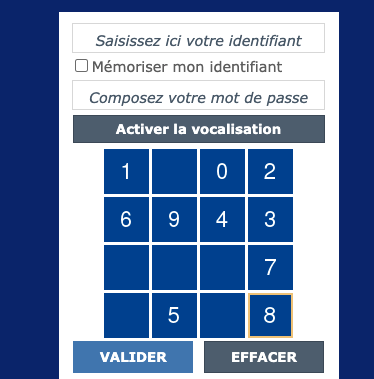
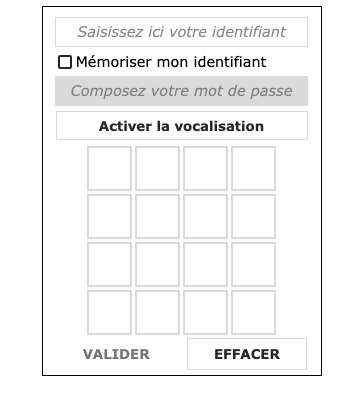
Hello, As shown in the attached file, the website I am consulting should display the box to enter a code as per attachment 1 (like a virtual keyboard), but since the last update of firefox, the box now appears empty as per attchment 2, preventing any selection of the right numbers.
What should I change for it to appears normally?
Thank you,
Christophe Ps: I also see now that when I tick the box below "email me when someone answers the thread", the box still appears empty (hope it is not as I would like ot receive the emails) and had that for another website since the last update.
Gekozen oplossing
cor-el said
This could be a problem with High Contrast Mode on Mac. See "New" in the release notes. Firefox now automatically enables High Contrast Mode when "Increase Contrast" is checked on MacOS in the Accessibility settings.Dit antwoord in context lezen 👍 1
Make sure you allow pages to choose their own colors.
- Settings -> General: Fonts & Colors -> Colors: "Override the colors specified by the page with my selections above"
Try "Never" if the default "Only with High Contrast themes" isn't working.
Alle antwoorden (3)
Hey there!
Please check out the link below on how you can get back the virtual keyboard:
WARNING: This script is not provided by Mozilla and is not officially supported
https://www.trishtech.com/2015/12/how-to-display-on-screen-keyboard-in-mozilla-firefox/
Hope I helped!
Kind regards,
Bithiah
[Warning added by moderator.]
Bewerkt door Chris Ilias op
Hey there!
Please check out the link below on how you can get back the virtual keyboard:
WARNING: This script is not provided by Mozilla and is not officially supported https://www.trishtech.com/2015/12/how-to-display-on-screen-keyboard-in...
Hope I helped!
Kind regards,
Bithiah
[Warning added by moderator.]
Bewerkt door Chris Ilias op

Gekozen oplossing
cor-el said
This could be a problem with High Contrast Mode on Mac. See "New" in the release notes. Firefox now automatically enables High Contrast Mode when "Increase Contrast" is checked on MacOS in the Accessibility settings.
Make sure you allow pages to choose their own colors.
- Settings -> General: Fonts & Colors -> Colors: "Override the colors specified by the page with my selections above"
Try "Never" if the default "Only with High Contrast themes" isn't working.