


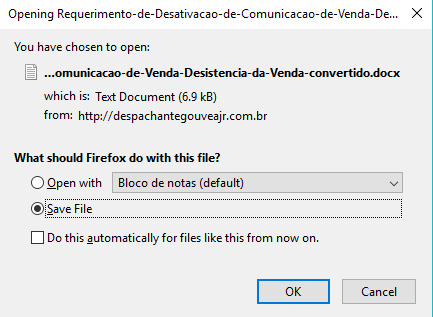
WordPress website .docx file recognized by Firefox as Text Document
I recently developed a small WordPress site where users can download some .docx files to fill in and provide to the authorities. However, there's an issue I'm facing with these downloads. Firefox is recognizing the .docx files on my server as Text Documents in the window (screenshot 1). However, it's definitely a .docx, as my computer recognizes it as such.
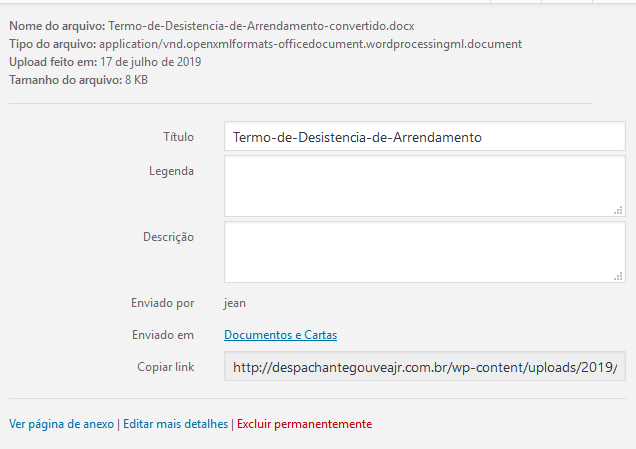
On the WordPress back-end, you can see that the content-type of the file (Tipo de arquivo) is set correctly (screenshot 2), so I'm at a loss. The people that will download these files are not tech savvy and they will just open them in Notepad, getting a bunch of gibberish.
Any kind of help is appreciated!
Alle antwoorden (2)
Did you check the HTTP response headers in the Firefox Network Monitor to see how the server is sending this file?
You can also check the handlers.json file for this MIME type in cse this is something on your end.
Can you post a link to a publicly accessible page (i.e. no authentication or signing on required)?
cor-el said
Did you check the HTTP response headers in the Firefox Network Monitor to see how the server is sending this file? You can also check the handlers.json file for this MIME type in cse this is something on your end. Can you post a link to a publicly accessible page (i.e. no authentication or signing on required)?
Thank you for your reply! Attached you can find the network monitor file line.
I've ruled out that this is something on my end, seeing as this happens with Firefox on all machines I tried it on (3 so far).
I lifted the password protection to access the website for now, this is the page with the documents: http://despachantegouveajr.com.br/documentos-e-cartas/
I myself am not very knowledgeable about this type of stuff, and I figured it'd be okay since that WordPress site was freshly installed.
Any help is appreciated!
