


I'm unable to change menu language
The main "Firefox" menu is in Japanese, but all the rest of the menus (File, Edit, View, History, etc.) are in English.
How can I change the "Firefox" menu's language back to English? I've already tried it in settings.
I am unable to attach screenshots for an unknown reason so will instead link them here:
MacOS 10.14.4 FF Quantum 66.0.3 (64-bit)
Bewerkt door Mike op
Gekozen oplossing
I'm on macOS and I managed to reproduce this.
To fix this, you'll need to uninstall the Japanese language.
- To go Tools > Addons > Languages.
- Beside Japanese, click Remove.
- Restart Firefox.
Alle antwoorden (16)

I for myself use Chrome for this feature so it can change languages on the fly. I use Windows but having Chrome being able to go to English helps alot especially on Online retailer sites.
Did you close and restart the Browser after doing that change?
WestEnd said
Did you close and restart the Browser after doing that change?
The change to test Japanese was over 2 months ago, and was reverted the same day. I quit the browser daily.
If the Firefox user interface (toolbars) is in the wrong language or if you want to change the current language then download Firefox in the language of your choice.
cor-el said
If the Firefox user interface (toolbars) is in the wrong language or if you want to change the current language then download Firefox in the language of your choice.
As you will see if you review the screenshots I linked to, all of the menus are in English except for the "Firefox" menu - which is in Japanese.
What does the "Help -> Troubleshooting Information" (about:support) page show for the language settings (Internationalization & Localization) at the bottom of this page?
Here is a screenshot:
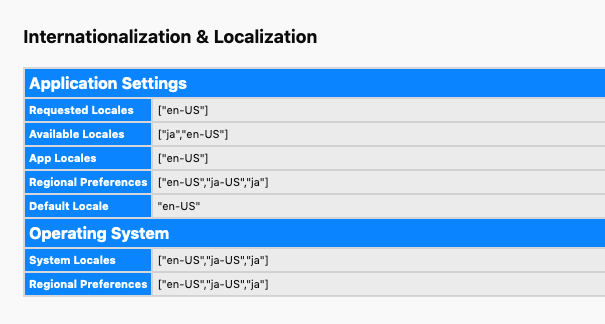
So, it looks that the OS system locale setting is used for the Firefox menu. I don't know whether Firefox handles (creates) this menu or that this menu is created/filled by the Mac OS because on Mac the main menu bar is handled by the OS and not under control of Firefox.
You could try to ask advice at the Mac support forum.
Mac forums are spectacularly unhelpful so it seems I may be stuck.
Thanks for your help, cor-el.
Maybe try Reddit and mozillaZine to see whether Mac users there have suggestions.

Gekozen oplossing
I'm on macOS and I managed to reproduce this.
To fix this, you'll need to uninstall the Japanese language.
- To go Tools > Addons > Languages.
- Beside Japanese, click Remove.
- Restart Firefox.
Not sure why I didn't think to try that myself! Thanks Chris.
Hi!
I got a similar problem. With every Firefox update in the last few years the menu language was set to German even though I haven't even installed the German language pack. So I couldn't even deactivate anything and in the options the language was always set to English - I also tried both British and US with no success. So far the only thing that ever worked was to reinstall Firefox completely but today not even this works anymore. Is there a solution to this old bug?
yours Xander
xander.dorn said
Is there a solution to this old bug?
Hi Xander !
Would you please take a look at the last post in this bug report :
https://bugzilla.mozilla.org/show_bug.cgi?id=1564998
See this thread : https://support.mozilla.org/en-US/questions/1268054
the purgecache doesn't work either
xander.dorn said
the purgecache doesn't work either
It's the first part of the last post in the bug report that did the trick (maunally updating the language pack) ......
(I added a link to that thread, because the OPs initial reaction was the same as yours is now)
Hi Xander, A post in this thread was marked as the solution by the person who asked the original question (mgibson323). Your issue may have similar symptoms, but it is likely a different cause/solution. You should use https://support.mozilla.org/en-US/questions/new where volunteers can get more details about your setup.
Because this thread is solved and more people might start using it for their own questions, I'm going to lock it.