


Windows 10 bereikte EO (einde ondersteuning) op 14 oktober 2025. Als je Windows 10 gebruikt, lees dan dit artikel.

Windows 10 reached EOS (end of support) on October 14, 2025. If you are on Windows 10, see this article.

Zoeken in Support

Vermijd ondersteuningsscams. We zullen u nooit vragen een telefoonnummer te bellen, er een sms naar te sturen of persoonlijke gegevens te delen. Meld verdachte activiteit met de optie ‘Misbruik melden’.

Meer info
Deze conversatie is gearchiveerd. Stel een nieuwe vraag als u hulp nodig hebt.
Opgelost Gearchiveerd

Text Size In Email Messages

srmsrm

I use Outlook and started using Thunderbird.

When I compose messages, I use Calibri 11 (medium). In Outlook, at 100% zoom the size of the text is easy to read (at least for me). In Thunderbird (zoom reset), the size of the text is smaller (see attached picture).

I can zoom Thunderbird three times to make the text about the same as I see in Outlook, but the zoom does not save. I cannot find an option for saving Zoom settings in messages nor could I find an add on. I found Zoom for the entire program add on, but not for text size in the messages. It may exist but I cannot locate one as of yet.

I also checked Tools / Options / Composition to see if there was a way to make the text display bigger. I can change my default font used in emails but no zoom / display setting.

Is there an option to maybe save the zoom and/or display the text bigger when composing a message?

Thank you.

Shawn
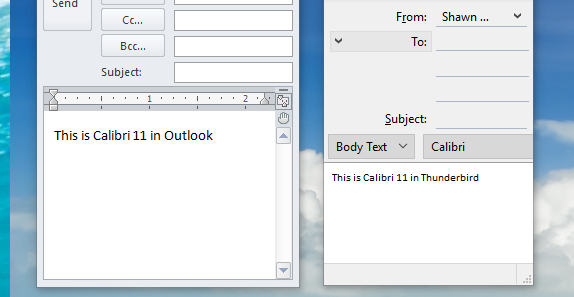
I use Outlook and started using Thunderbird. When I compose messages, I use Calibri 11 (medium). In Outlook, at 100% zoom the size of the text is easy to read (at least for me). In Thunderbird (zoom reset), the size of the text is smaller (see attached picture). I can zoom Thunderbird three times to make the text about the same as I see in Outlook, but the zoom does not save. I cannot find an option for saving Zoom settings in messages nor could I find an add on. I found Zoom for the entire program add on, but not for text size in the messages. It may exist but I cannot locate one as of yet. I also checked Tools / Options / Composition to see if there was a way to make the text display bigger. I can change my default font used in emails but no zoom / display setting. Is there an option to maybe save the zoom and/or display the text bigger when composing a message? Thank you. Shawn
Gekoppelde schermafbeeldingen

Alle antwoorden (3)

Took another look and did find some zoom add-ons. Hopefully one will work with text in messages.

Gekozen oplossing

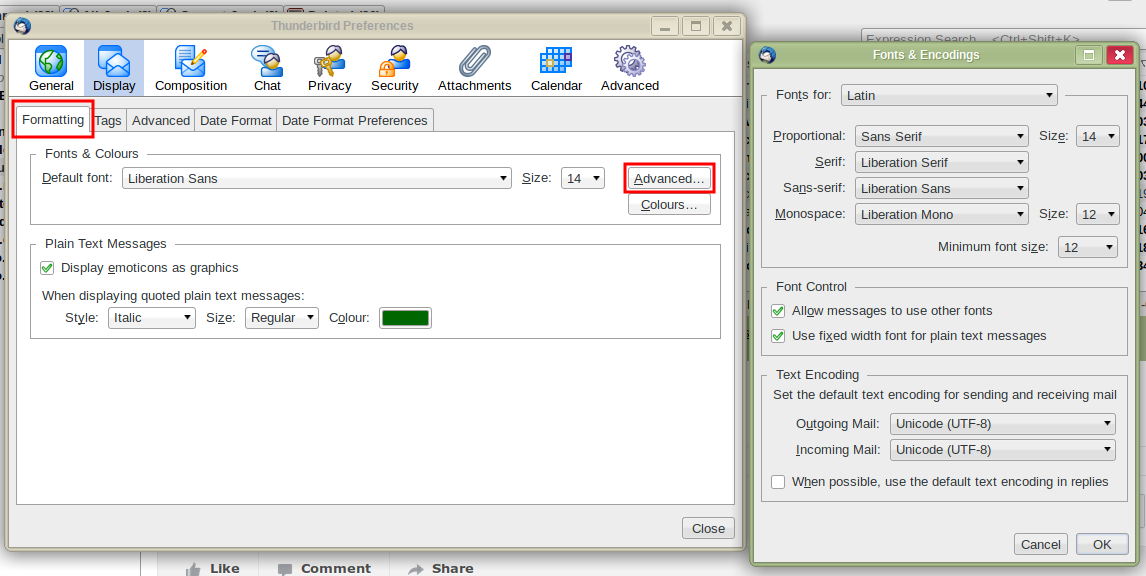
Go to Tools|Options|Display|Formatting→Advanced and check the font sizes there. Note that the sizes in this dialogue are in pixels not points so won't agree with your 11 pt. Try 14 px, or more if you have a high resolution screen.
Bewerkt door Zenos op

Thank you.

I was not aware of this setting nor the pixel / point measurement. This looked to have answered my question.

Thanks again.