


My options tab is inactive - can't change start page or view anything else

Firefox is working fine but since last upgrade the start page changed from Google to Bing and all tabs under "options" are inactive - I can't make changes to start page or even view the other tabs. Any fixes? thanks!
Gekozen oplossing
lyaga said
I really liked that theme too - don't like the new way to open tabs.
I'm not familiar with Scribblies. What do you mean by "the new way to open tabs"?
Alle antwoorden (8)
Hello there,
Have you tried to Refresh Firefox and see if that solves the issue?
Usually Refreshing Firefox will solve most of the issues.
Keep us posted!
Bewerkt door Machine Master op
Start Firefox in Safe Mode to check if one of the extensions (Firefox/Tools > Add-ons > Extensions) or if hardware acceleration is causing the problem.
- Switch to the DEFAULT theme: Firefox/Tools > Add-ons > Appearance
- Do NOT click the Reset button on the Safe Mode start window
Sometimes broken internal pages are caused by upgrade glitches, where Firefox doesn't completely replace old program files with new ones. If no other explanation/solution surfaces, you can address that using this procedure:
Clean Reinstall
We use this name, but it's not about removing your settings, it's about making sure the program files are clean (no inconsistent, corrupted, or alien code files). As described below, this process does not disturb your existing settings. Do NOT uninstall Firefox, that's not needed.
(1) Download a fresh installer for Firefox 39.0 from https://www.mozilla.org/firefox/all/ to a convenient location. (Scroll down to your preferred language.)
(2) Exit out of Firefox (if applicable).
(3) Rename the program folder, either:
(64-bit Windows folder names)
C:\Program Files (x86)\Mozilla Firefox
to
C:\Program Files (x86)\OldFirefox
(32-bit Windows folder names)
C:\Program Files\Mozilla Firefox
to
C:\Program Files\OldFirefox
(4) Run the installer you downloaded in #1. It should automatically connect to your existing settings.
Can you get to the Options page?
Note: Some plugins may exist only in that OldFirefox folder. If something essential is missing, look in these folders:
- \OldFirefox\Plugins
- \OldFirefox\browser\plugins
I appreciate the answers here - I refreshed and when I systematically re-added my add-ons and extensions found that it was the Scribblies Plain appearance extension that was causing the problem. I really liked that theme too - don't like the new way to open tabs.
thanks again.
Gekozen oplossing
lyaga said
I really liked that theme too - don't like the new way to open tabs.
I'm not familiar with Scribblies. What do you mean by "the new way to open tabs"?
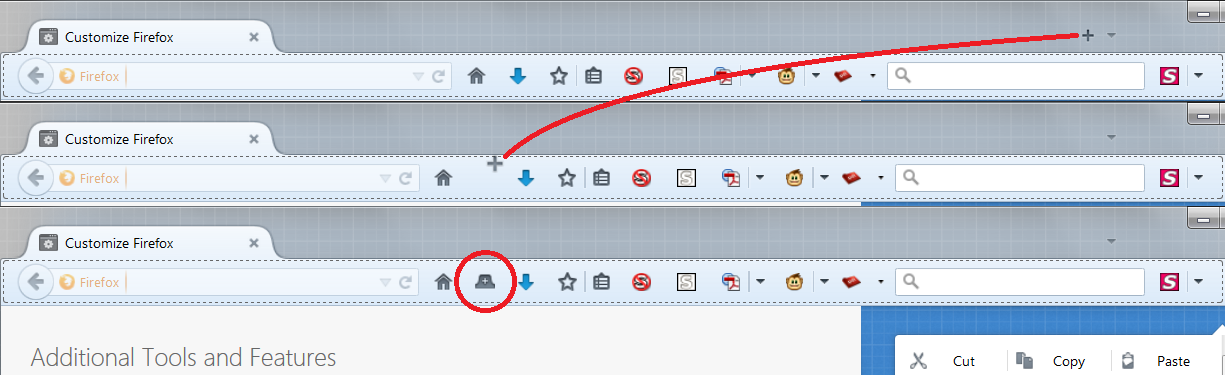
To my knowledge, the only way to open a tab is to click on the + sign to the right of other tabs which was an update a while back - in the Scribblies extension I can set an icon to open a tab right next to the home page - more convenient.
If you mean next to the home button on the main toolbar, you could try dragging the "+" button to the new location in Customize mode. Screen shot example attached.
Thanks j - worked great!