


Windows 10 bereikte EO (einde ondersteuning) op 14 oktober 2025. Als je Windows 10 gebruikt, lees dan dit artikel.

Windows 10 reached EOS (end of support) on October 14, 2025. If you are on Windows 10, see this article.

Zoeken in Support

Vermijd ondersteuningsscams. We zullen u nooit vragen een telefoonnummer te bellen, er een sms naar te sturen of persoonlijke gegevens te delen. Meld verdachte activiteit met de optie ‘Misbruik melden’.

Meer info

Deze conversatie is gearchiveerd. Stel een nieuwe vraag als u hulp nodig hebt.

Flash Player running twice after installing adobe flash player on windows 8/8.1, need help please.

  • 2 antwoorden
  • 6 hebben dit probleem
  • 53 weergaven
  • Laatste antwoord van cor-el

Well, i first tried to go on a website to watch an anime, but it says that i need the flash player plugin installed which i don't for cause of lags. I tried installing the adobe flash player for firefox since i know that Internet Explorer and Google Chrome had it installed by default. So then, after installing it, something went wrong. The plugin seems to be there, but when looking at my active processes, it said that flash is running twice, which now make the videos on youtube and everywhere else start lagging seriously bad. I've tried searching for answers to that kind of problem, but i cannot seems to be finding one. I would need help please.
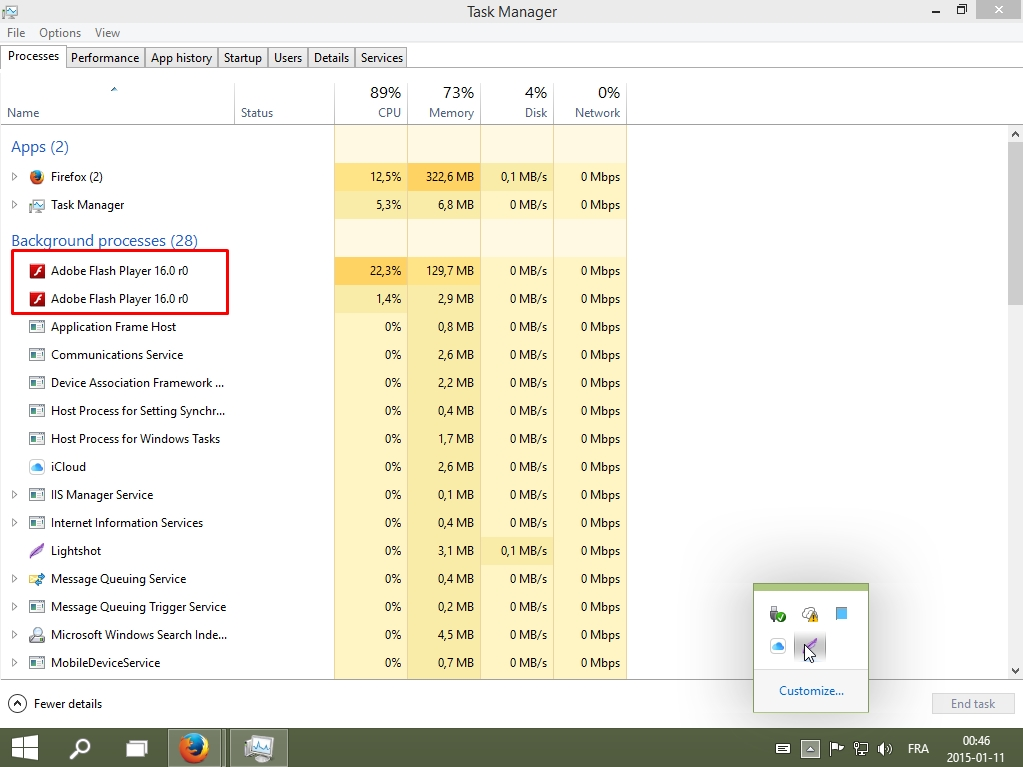
Well, i first tried to go on a website to watch an anime, but it says that i need the flash player plugin installed which i don't for cause of lags. I tried installing the adobe flash player for firefox since i know that Internet Explorer and Google Chrome had it installed by default. So then, after installing it, something went wrong. The plugin seems to be there, but when looking at my active processes, it said that flash is running twice, which now make the videos on youtube and everywhere else start lagging seriously bad. I've tried searching for answers to that kind of problem, but i cannot seems to be finding one. I would need help please.
Gekoppelde schermafbeeldingen

Bewerkt door Zone Of LifeTime op

Alle antwoorden (2)

Grab the uninstaller from here: Uninstall Flash Player | Windows Uninstall Flash Player | Mac Then reinstall the latest version.

Flash Player v16.0.0.235 https://www.adobe.com/products/flashplayer/distribution3.html Shockwave Director v12.1.5.155 http://get.adobe.com/shockwave/

Seeing more Flash processes is a consequence of running the Flash player plugin in a protected sandbox environment.