Permissions of Firefox profile folders
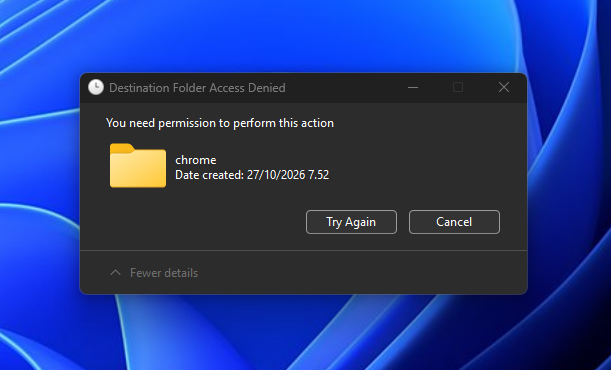
It would seem Firefox claims ownership of my file system and does not allow me to make changes even with admin permissions. I am completely prohibited from making any changes to the profile folder, copying any files into it, or doing anything other than copying from it. Simple chrome edits are utterly impossible, and security tabs or changing permissions has no effect.
This is rather worrisome.
All Replies (6)
Hi Spootiful, I think you might need to run Windows Explorer with administrator privileges to modify certain folders under AppData on Windows 11. When I Google about how to do that, it sounds much more complicated than it was in earlier versions of Windows.
Another option would be to do it through Notepad. In the Windows search box, type notepad and when the results come up, there should be a line below Notepad to Run as Administrator. Then in Notepad, if you call up Save As, the dialog should let you create new folders in sensitive locations. Does that work on yours?
The problem is that it only happens with Firefox and specifically only profile folders under Mozilla/Firefox/Profiles/. I can edit all other folders just fine, I can edit all other folders under Mozilla/ and Firefox/ just fine, I can even create my own folders under Firefox/Profiles/ and move, copy, create, and delete files.
But absolute nothing under a specific profile folder, except copy files out. I can understand certain security issues and perhaps wanting to prevent unwanted modification, but it becomes a problem if I can't modify it even as admin.
If you right-click the profile folder > Properties > Security, what rights do you have? For my longstanding profile, and a new one created through about:profiles, I have Full Control and haven't noticed any restrictions. But I haven't tested any new-style profiles (created through the menu) recently so maybe something has changed there.
I am the owner and I have full control. I do use multiple profiles created from the launch profile manager (and I have to select one every time I start), but I didn't think this could cause problems with permissions. I haven't moved over to the in-browser profile manager since I had my earlier launch profiles. Maybe that would help, but it's still a bit strange and potentially a risk.
The old internal profile manager (about:profiles page debuted in Firefox 47) works well for me.
The external profile manager has a nasty habit of changing my default profile, so I rarely use that one.
If you have full control, my only thought is some kind of in-use lock. ???
No problems, not even File Locksmith finds anything and Firefox isn't running. Although, I was using these profiles through several versions of both Firefox and Firefox Nightly. Still, I don't see how it manages to lock up my folders and deny permissions even at admin level. Avoiding profile corruption, locking profiles, that should all be inside the browser and not in the file system.