


Can I Mass Delete emails by Message Filter ? or any way to Delete several of the same sender emails

I have about 19,000 + emails in one of my email accounts , I do not want to delete all of them , just select groups , like for example I have about 392 emails from Newegg , what I want to do is get all of them in 1 place (I did this using the Filter Emails) , then I want to delete them all , but I don't want to delete EVERY email I have stored
I tried but I couldn't find any way to do a mass delete , like a Select All , Delete , I couldn't even find Delete unless it was for each email , which would take forever to sort through 19,000+ emails and delete the ones I want deleted , but leaving the rest
Is there any way to do this ?? , or is there a reason this has not been implimented ?? , it seems like a no brainer , basically my email is running slow , so when I click delete on a email , there is a pause before it deletes , I am assuming because of the backlog of emails (already read) that I have in my Inbox that I didn't delete at the time , and now have literally thousands of them
Basically what I was hoping for is to be able to take say ALL Newegg emails , and put them together , then do a Select All and Delete , but I couldn't find any way to do this , that way I get rid of the ones that have expired , but keep other emails from other people/buisnesses and just do Selective Mass Deletion
Thanks ... Jim
All Replies (5)

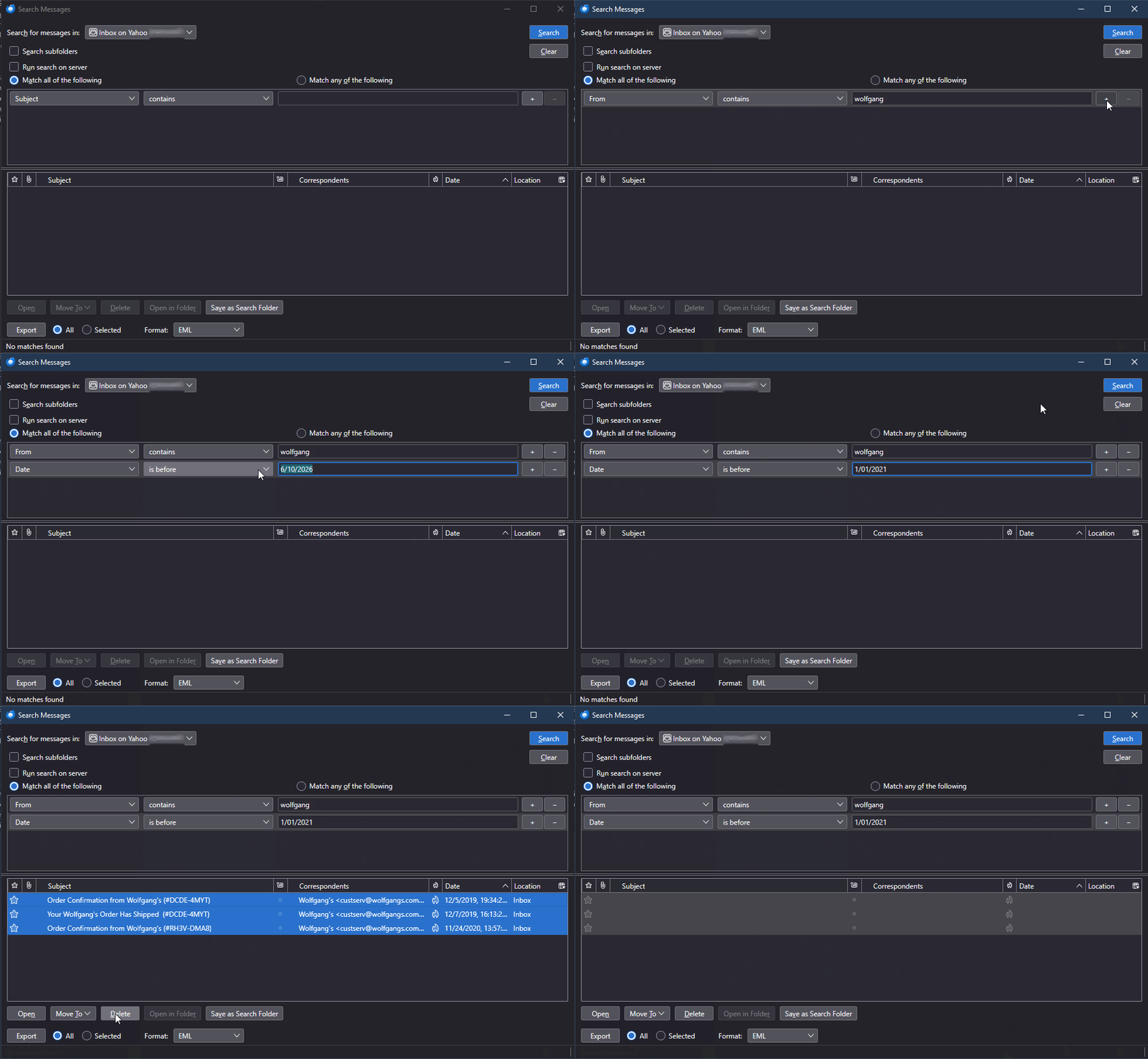
You're right that using the Global Search feature, there's no way to select multiple messages for deletion. This is the only search that will look in all accounts and folders (except by default Trash and Junk.) But check out the Search Messages feature (Edit | Find | Search Messages, or Ctrl+Shift+F). You can search individual folders or one entire account, just not multiple accounts. It can also save the search results as a Virtual Folder, so you can check out the messages closer and then decide which ones to delete or not.
Lin said
You're right that using the Global Search feature, there's no way to select multiple messages for deletion. This is the only search that will look in all accounts and folders (except by default Trash and Junk.) But check out the Search Messages feature (Edit | Find | Search Messages, or Ctrl+Shift+F). You can search individual folders or one entire account, just not multiple accounts. It can also save the search results as a Virtual Folder, so you can check out the messages closer and then decide which ones to delete or not.
OK , Thank you for the reply , so if I "Search" and select my Inbox , and then I can select (for example) Newegg , within that folder , and just delete all of those ?? , or does the entire contents of the Inbox have to be deleted ? (I don't want that to happen)
Yes. You can even build complex searches involving From, Subject, Date, etc. if you want. When you select messages from the results you can delete, move, view them right from there. See the attached animation.
If it makes you nervous, just delete a few at a time at first and confirm that they go into Trash as you expect. Then, when you're sure it's doing what you want, you can Delete many all or at once.
Modified by Lin
Lin said
Yes. You can even build complex searches involving From, Subject, Date, etc. if you want. When you select messages from the results you can delete, move, view them right from there. See the attached animation. If it makes you nervous, just delete a few at a time at first and confirm that they go into Trash as you expect. Then, when you're sure it's doing what you want, you can Delete many all or at once.
Thank you ... One question , How are you selecting them ALL ?? , I have over 300 to delete of just the Newegg one's , I tried Control and Left Click , but it doesn't select them all
To select them all, select just one, then hit <Ctrl+a> to select All. You can also select non-contiguous ones by holding Ctrl while selecting each one. You can also select a range by selecting one, then, while holding <Shift>, select another one - both those and all the ones between them will be selected. These are standard Windows (and most other GUI) keyboard shortcuts.