


Thunderbird for Android sub folders

Within my Outlook.com email account i have an archive folder with 36 sub folders.
In the Thunderbird app for Android only 2 of these sub folders are visible.
I cannot find any setting that to resolve this issue
Chosen Solution
Problem now resolved - it is an issue with the folders in Outlook that were created in Outlook app.
By adding new folders in Outlook Web view & moving emails into them they become visible!
All Replies (8)

Topic has been moved to the TB for Android queue.

Have you tried tried refreshing the folder list within the app?
Open the side menu
- Tap your account
- Tap manage folders (bottom of list)
- Tap 3 dot menu
- Tap refresh folders
Are the missing folders listed under manage folders?
Using outlook webmail, I tested adding 4 new folders within the Archive folder. After refreshing the apps folder list, all were correctly displayed.
Are your 36 folders located immediately under Archive, or nested several levels deep (sub folders within sub folders)?
Within the Android app there is no setting for manage folders nor an option to refresh folders!
All 36 folders are sub folders of the archive folder & are each immediately under the archive folder
You can see both 'Manage folders' and 'refresh folders' shown in the attached screen shot.
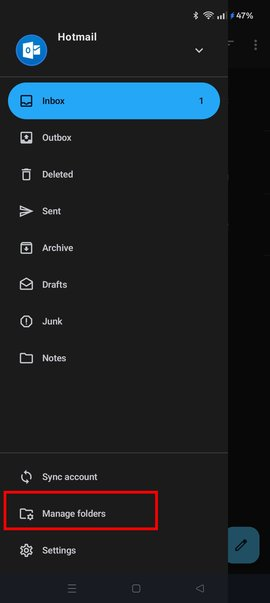
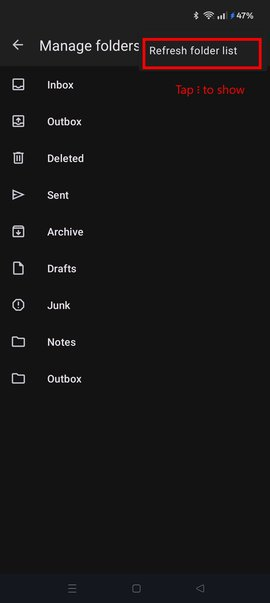
Problem still existed after refreshing folder list but I have found the solution!
This seems to be an issue on outlook.com - by creating new folders in Outlook webview they become visible in Thunderbird mail.
Now for a long process of adding new folders & moving emails!
Modified by brian.windsor
Hi Brian Would you be able to review or share a debug log capturing a refresh of the folder list? You can find a guide to capture the log linked below.
If you search the generated log file for the text string: CommandRefreshFolderList You should see the folder names being retrieved close to this entry in the log. It may illuminate some errors or give a pointer at the issue.
Chosen Solution
Problem now resolved - it is an issue with the folders in Outlook that were created in Outlook app.
By adding new folders in Outlook Web view & moving emails into them they become visible!
I am running Thunderbird version 22 on android 16 And not all my outlook folders are showing, all are in the root of my outlook.com .
I have tried to move emails into the folder via the outlook.com webmail and done a sync account and a refresh folder list and still missing folders
I have 65 sub folders in my root outlook email folder of which only 52 are visible in the app.
Have I reached a limit of some sort?
If you need more troubleshooting steps let me know what I need to do...
Cheers Pasquale